What Is MPO Cable? Complete Guide to Selection,800G Demand&Pitfall Avoidance
Jun 24, 2026
Leave a message
What Is MPO Cable? An MPO (Multi-fiber Push-On) cable is a high-density, pre-terminated fiber optic patch cord that integrates 8 to 144 optical fibers into a single compact rectangular connector - the same footprint as a standard SC connector - governed by IEC 61754-7 and TIA-604-5 (FOCIS 5) international standards. Unlike traditional duplex LC or SC patch cords that carry one or two fibers per connector, a single MPO cable replaces 8, 12, 16, or 24 individual fiber jumpers simultaneously, reducing rack cabling space by over 70%. Inside each MPO connector sits a precision MT (Mechanical Transfer) ferrule measuring 6.4 mm × 2.5 mm, with two 0.7 mm guide pins spaced 4.6 mm apart for micrometer-level fiber alignment (offset error ≤ ±0.5 μm). MPO cables are the mandatory interface for 40G SR4, 100G SR4, 400G SR8, and 800G SR8 parallel optical transceivers, and are deployed in hyperscale data centers, AI/GPU clusters, 5G fronthaul networks, and high-density structured cabling systems. This guide covers every dimension of MPO cable selection: connector anatomy, polarity types (Type A/B/C), key orientation, fiber mode (OM3/OM4/OM5/OS2), loss budgets, 800G/1.6T demand drivers, and the most common deployment pitfalls.

1. What Is an MPO Cable?
MPO cable is a multi-fiber, pre-terminated fiber optic patch cord that uses a Multi-fiber Push On (MPO) connector to transmit 8 to 144 optical fibers through a single compact interface. It follows the IEC 61754-7 and TIA-604-5 (FOCIS 5) international standards, enabling plug-and-play deployment in data centers, 5G networks, and fiber-to-the-home (FTTH) systems without any field splicing.

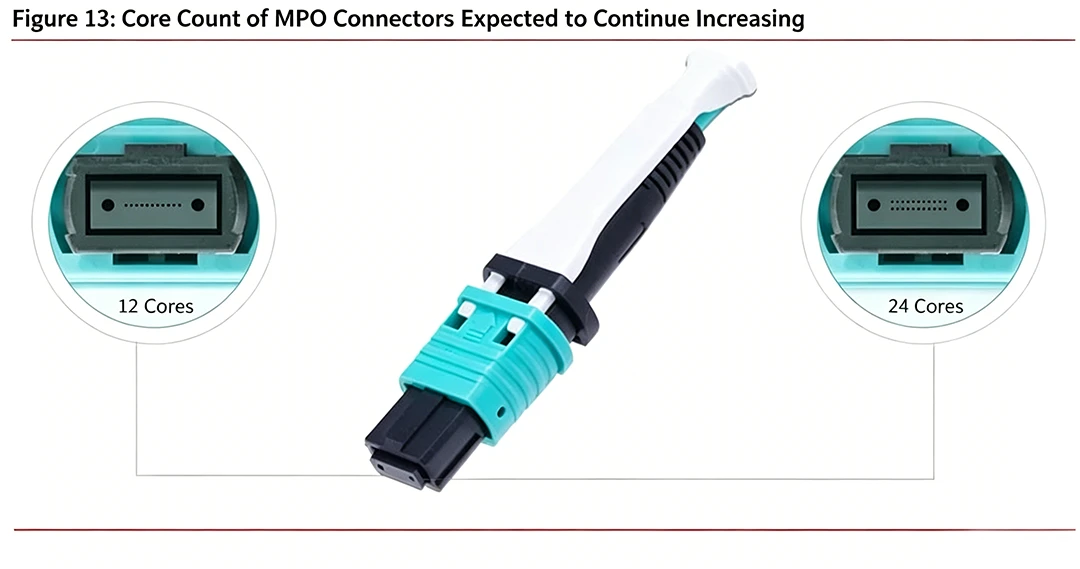
At its physical core, an MPO connector occupies the same external housing width as a standard SC connector (approximately 8.6 mm wide), yet consolidates an entire fiber array - 1 row of 8 or 12 fibers, or 2 rows of 24 fibers - inside a single rectangular MT ferrule measuring 6.4 mm × 2.5 mm. The fiber holes are precision-drilled at a 0.25 mm center-to-center pitch in a linear or dual-row arrangement, with two 0.7 mm diameter guide pin holes positioned 4.6 mm apart on either side to guarantee sub-micron ferrule-to-ferrule alignment. The result: one MPO-12 connector delivers the same transmission capacity as 6 duplex LC connections; one MPO-24 connector replaces 12 duplex LC connections - eliminating 11 separate cable runs in a single plug.
To understand how an MPO cable achieves such high density, consider the layout of its multi-fiber array. In standard 8-, 12-, and 24-fiber configurations, the optical fibers are arranged in a linear row across the MT ferrule with the keyway centered on the connector housing. However, for ultra-high-speed 16-fiber and 32-fiber parallel optical links (such as 400G and 800G SR8 applications), the connector features an offset keyway positioned to the left. This offset design acts as a physical keying safeguard, preventing accidental mating of 16-fiber connectors into legacy 12-fiber or 24-fiber interfaces. Additionally, while lower-density MPO cables utilize a single row of fibers, configurations of 24 fibers or more organize the fibers into multiple stacked rows inside the MT ferrule, maintaining high alignment accuracy within an offset tolerance of ±0.5 μm.
Common MPO fiber configurations and their primary network applications are as the table below:

Here's how fiber count maps to network speed:
|
Fiber Count
|
Row Layout
|
Primary Network Application
|
Typical Transceiver Interface
|
|---|---|---|---|
|
8-fiber
|
1 row × 8
|
Early 40G SR4 (legacy)
|
QSFP+ SR4
|
|
12-fiber
|
1 row × 12
|
40G and 100G SR4 (current mainstream)
|
QSFP28 SR4 / QSFP+ SR4
|
|
16-fiber
|
1 row × 16 (offset key)
|
400G SR8, 800G SR8
|
QSFP-DD SR8 / OSFP SR8
|
|
24-fiber
|
2 rows × 12
|
High-density 400G aggregation; breakout to 2× MPO-12
|
QSFP-DD / CFP8
|
|
32-fiber
|
2 rows × 16 (offset key)
|
800G and 1.6T SR16
|
OSFP 800G / future 1.6T
|
|
48/72/144-fiber
|
Multi-row
|
Hyperscale data center backbone, MDA/HDA trunk
|
MPO trunk cable
|
Because MPO cables are factory pre-assembled and 100% optically tested before shipment, there's no need for on-site fiber splicing. You unbox, plug in, and go. This plug-and-play design dramatically reduces deployment complexity for high-speed optical interconnects.

2. How Is an MPO Connector Built? Anatomy and Key Components
Understanding what's inside an MPO connector helps you see why precision matters and where problems start when quality is poor.
The MT Ferrule: Heart of the Connector
At the center of every MPO connector sits an MT (Mechanical Transfer) ferrule. It's a rectangular ceramic insert measuring 6.4 mm × 2.5 mm. The fibers are arranged in precise rows across the ferrule's end face.
On either side of the end face, you'll find two guide holes with a diameter of 0.7 mm, spaced exactly 4.6 mm apart. These holes accept guide pins (also called PIN needles) that align the mating connector's fibers with micrometer-level accuracy, keeping offset error within ±0.5 μm.
Key Position: Centered vs. Offset - A Critical Compatibility Detail
Not all MPO connectors use the same key position. For 8-fiber, 12-fiber, and 24-fiber connectors, the key tab is centered on the connector housing - this is the universal standard for most current data center deployments. However, 16-fiber and 32-fiber MPO connectors designed for 400G SR8 and 800G SR8 applications use an offset key, shifted to the left of the housing centerline.
This offset is not cosmetic. It is a physical mismatch-prevention mechanism: a 16-fiber MPO connector with an offset key cannot be accidentally inserted into a 12-fiber or 24-fiber adapter with a centered keyway. Given that 12-fiber and 16-fiber connectors are visually nearly identical, this offset key is the only hardware-level safeguard against a catastrophic fiber-count mismatch during installation.
Rule: Always verify key position - centered or offset - before ordering MPO connectors for 400G SR8 or 800G SR8 deployments.
Male vs. Female: Know the Difference
MPO connectors come in two types:
Male (with pins): The connector end face has two metal guide pins protruding from the guide holes. These pins actively align with the female connector during mating.
Female (no pins): The connector end face has open guide holes but no pins. It receives the male connector's pins for alignment.
The distinction between male (pinned) and female (unpinned) connectors dictates the fundamental mating rules of MPO cabling. Proper alignment relies entirely on the two 0.7 mm diameter metal guide pins of the male connector inserting cleanly into the matching guide holes of the female connector. When mating MPO connectors through an adapter, a male-to-female connection is mandatory. Attempting a female-to-female connection leaves the two MT ferrules without alignment pins, causing a microscopic misalignment (or offset) of the fiber cores. Even an offset of a few micrometers will lead to catastrophic insertion loss (IL) and extremely high return loss (RL), rendering the link inoperable. Conversely, attempting a male-to-male connection causes the metal guide pins to crash directly into each other, permanently damaging the precise pin tips and destroying the ceramic ferrules.

Internal Components
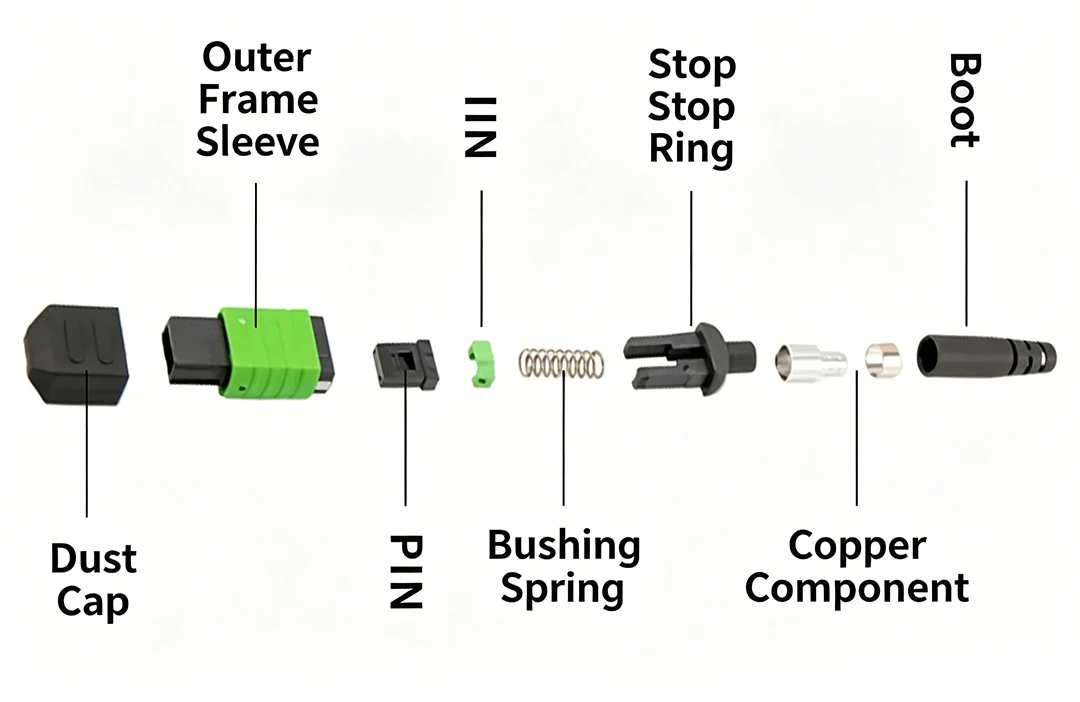
A complete MPO connector assembly includes these parts:
Tail sleeve (boot): Protects the cable-to-connector junction and manages bend radius
Coupling nut: Secures the connector to the adapter
Stop ring: Prevents over-insertion
Spring: Applies axial pressure on the ferrule to ensure consistent physical contact between mating end faces
Guide pins: Provide precision fiber alignment (male connectors only)
Retainer clip: Holds the ferrule in position
MT ferrule: Houses all fiber end faces
Outer housing: The main connector body with a key tab on one side
Dust cap: Protects the end face from contamination when not in use
The Key Tab and White Dot
On the side of the outer housing, you'll notice a raised tab called the Key. This tab determines the connector's insertion orientation and identifies where fiber #1 sits. On the housing, a small white dot marker provides a quick visual reference for fiber position.

Together, the Key and white dot prevent you from inserting the connector upside down, which would scramble the fiber sequence entirely. It's a built-in anti-fool mechanism that only works if you pay attention to it during installation.
3. What Are the Three MPO Polarity Types and Why Do They Matter?
MPO polarity defines how the transmit (Tx) and receive (Rx) fibers map between two connected ends. A complete optical link needs at least two fibers (one sends, one receives), and polarity ensures the sender on one end connects to the receiver on the other.
MPO polarity is the standardized mapping that defines which transmit (Tx) fiber on one end of a cable connects to which receive (Rx) fiber on the opposite end, as specified in TIA-568.0-D and IEC 61754-7. Three configurations exist - Type A, Type B, and Type C - and selecting the wrong type for your transceiver pairing will result in complete link failure, as the Tx output on one device will feed into the Tx input (instead of Rx) on the connected device.
The industry defines three standard polarity configurations: Type A, Type B, and Type C. Here's how each one works.
Type A: Straight-Through
In a Type A cable, the fiber positions are identical on both ends. Fiber 1 on one end connects to fiber 1 on the other end. Fiber 12 connects to fiber 12. The Key orientation is opposite on each end: one side is Key Up, the other is Key Down.
Best for: Direct connections between the same type of equipment (switch to switch).

Type B: Reversed (Crossover)
In a Type B cable, the fiber positions are completely reversed. Fiber 1 on one end connects to fiber 12 on the other. Fiber 12 connects to fiber 1. Both ends share the same Key orientation: Key Up to Key Up, or Key Down to Key Down.
Best for: Connections between different equipment types (switch to server). This is the most widely used polarity in modern parallel optic deployments.

Type C: Pair-Swapped
Type C swaps adjacent fiber pairs. Fiber 1 on one end connects to fiber 2 on the other. Fiber 2 connects to fiber 1. Fiber 11 goes to fiber 12, and fiber 12 goes to fiber 11. The Key orientation is opposite, like Type A: Key Up to Key Down.
Best for: Specific bidirectional transmission scenarios (like ODN splitters). Type C has the narrowest range of applications.

MPO Polarity Quick-Reference Tabl
|
Polarity Type
|
Fiber Mapping
|
Key Orientation
|
Primary Use Case
|
TIA-568.0-D Method
|
|---|---|---|---|---|
|
Type A
|
Straight (1→1, 12→12)
|
Key Up ↔ Key Down
|
Switch-to-switch; patch panel-to-patch panel
|
Method A
|
|
Type B
|
Reversed (1→12, 12→1)
|
Key Up ↔ Key Up
|
Switch-to-server; most QSFP/SFP transceiver links
|
Method B
|
|
Type C
|
Pair-swapped (1↔2, 11↔12)
|
Key Up ↔ Key Down
|
Bidirectional ODN splitter links
|
Method C
|
Selection tip: Check your equipment port's polarity label (usually marked Key Up or Key Down) or review the device manual's interconnect topology diagram. For most data center links, start with Type A or Type B. For a deeper dive into connector polarity, see our guide on MPO MTP connector types and polarity.
4. Why Is MPO Cable Demand Surging? The 800G, 1.6T, and CPO Connection
The MPO cable market isn't just growing. It's accelerating. Data centers now account for 44.7% of all MPO connector revenue, and that share keeps climbing. To understand why, you need to follow the speed roadmap from 100G to 1.6T, and then look at how CPO (Co-Packaged Optics) changes the game.

More Speed Means More Fibers per Port
Each generation of optical modules demands more parallel fiber lanes, which means more MPO fibers per connection:
100G SR4: 4 lanes × 25G per lane = 8 active fibers on a 12-fiber MPO
400G SR8: 8 lanes × 50G per lane = 16 active fibers on a 16-fiber MPO
800G SR8: 8 lanes × 100G per lane = 16 active fibers on a 16-fiber MPO
1.6T (emerging): Expected to require 16 lanes or multi-connector architectures using 32+ fibers
As the industry migrates from 100G to 400G and 800G optical transceivers, every single port upgrade increases the number of MPO fibers consumed. At COBTEL, as a core manufacturer of high-speed optical chips (DFB/EML), optical transceivers, and MPO patch cords, we've developed end-to-end 400G/800G/1.6T transmission solutions specifically for AI data centers, and we see this fiber demand escalation firsthand.
The Scale Factor: AI Data Centers Multiply Everything
AI training clusters require massive GPU-to-GPU interconnects. A single AI training rack may contain dozens of high-speed optical links running at 400G or 800G. Multiply that across thousands of racks in a hyperscale facility, and the MPO cable volume per data center grows exponentially.
The data center cabling market is projected to grow from 18.1 billion by 2035, with fiber optic cabling representing 59.3% of total share. MPO cables sit at the center of that growth.

CPO: Where Both Price and Volume Rise Together
Co-Packaged Optics (CPO) integrates optical engines directly onto the switch ASIC package, eliminating the traditional pluggable transceiver module. This sounds like it might reduce cabling, but the opposite happens.
Why CPO increases MPO cable volume: CPO architectures push optical I/O closer to the chip, but each optical engine still requires fiber connections. Because CPO enables more total bandwidth per switch (3.2T, 6.4T, and beyond), the number of fiber connections per switch actually goes up. Every optical engine port needs its own MPO cable or breakout cable.

Why CPO increases MPO cable value (price): CPO demands tighter tolerances. The shorter optical path inside a CPO package means insertion loss budgets shrink. That drives demand for premium-grade, low-loss MPO cables with elite ferrule polishing. Higher quality means higher price per meter.

This is the "price and volume rising in tandem" dynamic that makes MPO cable one of the few components in the optical supply chain where both average selling price and total units shipped are increasing simultaneously.

The MPO connector market's projected 10.3% CAGR through 2034 reflects this dual growth engine. For data center architects, the message is clear: MPO cable procurement planning should scale ahead of transceiver deployment, not behind it.

5. What Are the 4 Core Advantages of MPO Cables?
MPO cables offer four key advantages over traditional single-fiber patch cords: high-density fiber integration that saves 70%+ rack space, factory pre-terminated construction that cuts deployment time in half, multi-speed parallel transmission with low insertion loss, and modular upgrade paths from 40G through 1.6T.
Let's break down each advantage with real numbers.

5.1 High-Density Integration: More Fibers, Less Space
In data centers, rack space is expensive. Every unit of height matters.
A single MPO port replaces up to 12 or 24 individual LC duplex ports. In a 1U patch panel, MPO connectors support up to 768 fiber terminations. Scale that to 4U, and you reach 4,608 fibers in a single panel. Traditional LC-based patching can't come close to that density.
For hyperscale facilities running thousands of server connections, this density improvement isn't a nice-to-have. It's a hard requirement.

5.2 Pre-Terminated Plug-and-Play: 50% Faster Deployment
MPO cables ship fully assembled and optically tested from the factory. There's no field splicing, no fusion splicer rental, and no waiting for a fiber technician.
The workflow is simple: unbox, verify end-face cleanliness, insert the connector, and the link is live. In one banking data center project, a team deployed 3,000 nodes using MPO pre-terminated cables in just 3 days. The same scope with traditional field-terminated fiber would have taken two weeks or more. That's a deployment time reduction of roughly 75%.

5.3 High-Speed Transmission with Proven Reliability
MPO cables support parallel transmission across 40G, 100G, 400G, and 800G links. Here are the performance benchmarks for quality MPO products:
The high-precision MT ceramic ferrule and guide pin system keep fiber alignment within ±0.5 μm, delivering stable, repeatable performance over hundreds of mating cycles.
5.4. Modular Upgrade Path: Scale Without Starting Over
MPO's modular architecture supports smooth network evolution:
40G to 100G: Use MTP breakout harnesses (fan-out cables) to transition without replacing trunk cables.
100G to 400G: Upgrade from 12-fiber to 16-fiber MPO or use dual 12-fiber MPO connections.
400G to 800G to 1.6T: The same cabling infrastructure supports next-generation optical transceiver modules as they become available.
This forward-compatible design protects your cabling investment. You upgrade the transceivers at each end; the MPO trunk cables stay in place.

6. How Do You Choose the Right MPO Cable? A 5-Dimension Selection Guide
Choosing the right MPO cable comes down to five dimensions: fiber count, male/female type, key orientation, polarity, and fiber mode (OM grade or single-mode). Get any one of these wrong, and the link either won't work or will degrade performance.
Here's the full selection framework.
Dimension 1: Fiber Count (Channel Capacity)
Match fiber count to your transceiver standard and speed tier.
Quick formula for multi-row connectors: The total fiber sequence number S = X(R-1) + N, where X = fibers per row, R = row number (counting from bottom), and N = position within that row.
Practical rule: 90% of scenarios work fine with 12-fiber MPO. For 400G networks, you'll need 16-fiber or dual-row 12-fiber. Always select more capacity than you need today to allow room for future upgrades.

Dimension 2: Male / Female (Connection Matching)
Male connector: Features two metal guide pins on its end face, used to precisely align with the guide pin holes on the female connector, ensuring alignment of the fiber end faces.
Female connector: Lacks guide pins; instead, its end face contains guide pin holes that match those on the male connector.
This is where most installation mistakes happen. As noted above, MPO connectors are either male (with two guide pins) or female (with guide holes only).
The iron rule: Always connect male to female through an MPO adapter.
❌ Male to male = guide pin collision and physical damage
❌ Female to female = no alignment, severe return loss
✅ Male + MPO adapter + Female = proper connection
Before ordering, confirm whether each end of your link requires a male or female connector. Check your patch panel and equipment port specs.

Dimension 3: Key Orientation (Finding Fiber #1)
The Key tab on the connector housing works with the adapter's slot to force a specific insertion angle. This is how the system identifies which fiber is #1.
Key Up: Key tab faces upward (the default orientation in most configurations)
Key Down: Key tab faces downward (used on one end of Type A and Type C cables)
Key orientation is a physical anti-fool mechanism. It prevents you from plugging the connector in backwards, which would reverse the fiber sequence. Always verify key direction against your polarity type before insertion.

Dimension 4: Polarity (Tx/Rx Alignment)
We covered the three polarity types (A, B, C) in detail earlier. For selection purposes, remember:
Check your equipment port label for polarity and Key Up/Key Down markings.
Consult the device manual's interconnect topology diagram.
Type A and Type B cover the vast majority of use cases. Type C is rare.
Dimension 5: Fiber Mode (OM Grade or Single-Mode)
The fiber type you choose sets a hard limit on how far and how fast your link can go. For MPO cables, here's the selection matrix for multimode fiber types (OM3 to OM5):
Key reminders:
For 100G and above, always pick OM4 or OM5. OM3 doesn't have enough bandwidth.
If your link extends beyond the building or exceeds 150 m, switch to single-mode OS2 (this requires custom single-mode MPO cables).
Inside the data center, OM5 offers additional future-proofing by supporting short-wavelength division multiplexing (SWDM), which can reduce fiber count requirements by up to 75% compared to OM4 in certain multiplexing scenarios.

The 4-Step Selection Workflow
Here's the fastest way to nail your selection:
Define the scenario: Link speed (100G/400G/800G), distance (50 m, 150 m, 2 km), and equipment port type (male/female, Key Up/Down).
Match fiber type: Pick OM4/OM5 for 100G+ short-reach. Pick OS2 for anything beyond the building.
Lock core parameters: Fiber count (12/16/24) → Polarity (A or B) → End-face polish (UPC for multimode, APC for single-mode) → Male/female pairing.
Verify compatibility: Confirm the cable works with your MPO adapter and optical module (e.g., 100G SR4, 400G DR4). Test before you deploy at scale.
7. What Is the Difference Between MPO and MTP Cables?
MTP is a trademarked, performance-enhanced version of the MPO connector, manufactured by US Conec. Every MTP connector meets the MPO standard, but not every MPO connector qualifies as MTP. The difference lies in precision engineering: MTP features a floating ferrule, tighter insertion loss specs, and longer mating life.
Here's a side-by-side comparison:
When to use standard MPO: Budget-conscious projects, moderate-density data centers, and links with fewer than 500 expected mating cycles over the cable's lifetime.
When to use MTP: AI training clusters, hyperscale facilities, high-frequency maintenance environments, and any link where you need the lowest possible insertion loss. For a full breakdown, see our MTP cable types guide.
At COBTEL, we manufacture both standard MPO and premium MTP-grade patch cords. Every cable goes through 100% end-face inspection and optical performance testing before it leaves our factory, so you get verified quality regardless of which tier you choose.
8. MPO Cable Application Scenarios: Data Centers, 5G, AI, and Beyond
MPO cables aren't limited to one use case. Here's where they show up across modern network infrastructure.
Data Centers
This is MPO's home turf. Common deployment points include:
Server-to-ToR (top-of-rack) switch high-speed interconnects
Core switch to aggregation layer backbone links
Spine-leaf architecture all-optical fabric
400G/800G network migration and expansion
In a spine-leaf topology, every leaf switch connects to every spine switch. That multiplies the number of optical links quickly, and MPO trunk cables combined with breakout harnesses are the standard way to manage that density.
5G and Telecom
5G networks demand dense, reliable fiber connections:
Fronthaul (25G/50G): MPO-8 single-mode with Type A polarity, supporting up to 10 km
Midhaul/Fronthaul (100G): MPO-24 single-mode with Type B polarity, supporting up to 40 km
DWDM systems: MPO cables serve as high-density patch interfaces at optical multiplexer/demultiplexer nodes
AI and High-Performance Computing
AI workloads generate unique cabling demands:
GPU-to-GPU interconnects in training clusters require ultra-low-latency links
Storage-to-network fabric connections at 200G/400G
AI inference clusters scaling to 800G per link
Cabling design must align with transceiver selection, especially in 800G and 1.6T architectures. Choosing the wrong fiber type, polarity, or connector configuration can prevent links from establishing, even when high-end transceivers are installed.
Industrial and Specialty
MPO cables also serve in more specialized environments:
Industrial automation: Fiber's immunity to electromagnetic interference makes MPO ideal for factory floor networks
Military radar systems: Ruggedized MPO assemblies support high-bandwidth sensor data transmission
8K video production: 100-meter 8K uncompressed video transport over multimode MPO
9. How Do You Match MPO Cables to Optical Modules? The Triple-Match Rule
Every MPO cable must match its optical transceiver in three ways: form-factor fiber count, active channel mapping, and fiber mode. Getting even one wrong causes signal loss, link failure, or (in the worst case) physical damage to the transceiver port.
Here's the triple-match framework:
Match 1: Form Factor to Fiber Count
For detailed transceiver pairing guidance, check our QSFP-DD transceiver guide.
Match 2: Active Channels to Used Fibers
A 100G SR4 transceiver uses 4 transmit + 4 receive lanes = 8 active fibers. But it connects to a 12-fiber MPO. The remaining 4 fibers sit unused as spares. A 400G SR8 uses all 8 transmit + 8 receive lanes = 16 active fibers on a 16-fiber MPO, with no spares.
Understanding this mapping prevents you from ordering the wrong fiber count or assuming all fibers are active.
Match 3: Fiber Mode (Absolute Rule: Never Mix)
Multimode transceivers (SR designation) must connect through multimode MPO cables (OM3/OM4/OM5).
Single-mode transceivers (LR, ER, DR designation) must connect through single-mode MPO cables (OS2).
A hard lesson from the field: Connecting a single-mode cable to a multimode transceiver doesn't just degrade signal. It can burn out the receiver optics. We've seen this happen on live deployments. Always double-check before you plug in.
10. MPO Cable Installation: 4 Must-Follow Practices
Even the best MPO cable will fail if you handle it wrong during installation. Follow these four practices to protect your investment.
10.1 Handling and Storage
MPO cables are precision optical assemblies. Treat them accordingly.
Never bend a cable tighter than 10 times the cable outer diameter. For a 3 mm cable, that means a minimum bend radius of 30 mm.
Inspect end faces before installation. Reject any cable with visible scratches or contamination on the ferrule.
Store cables in their original packaging until you're ready to install.
10.2 End-Face Cleaning (The #1 Overlooked Step)
End-face contamination is the leading cause of MPO link failures. A single dust particle on a ferrule can increase insertion loss by 1 dB or more.
Use a dedicated MPO end-face cleaner (cassette-type or pen-type designed for MT ferrules).
Never use alcohol wipes. They leave fiber residue on the end face that creates new contamination.
Clean both before and after every insertion. Make it a habit, not an afterthought.
10.3 Labeling and Documentation
With dozens or hundreds of MPO cables in a single cabinet, you'll lose track fast without proper labels.
Tag both ends of every cable with clear, durable labels.
Record: origin port, destination port, fiber count, polarity type, and cable length.
Use color-coded boots to distinguish cable types visually (e.g., aqua for OM3/OM4, lime green for OM5, yellow for OS2).
10.4 Proper Insertion Technique
Always grip the connector body. Never pull on the cable itself.
Verify Key orientation matches the adapter slot before inserting.
Push until you hear a "click." That click confirms the connector is fully seated and the spring is engaged.
If it doesn't click, stop. Check the orientation and try again. Forcing a misaligned connector damages the guide pins.
11. Conclusion
MPO cable is the high-density fiber backbone that makes 40G, 100G, 400G, 800G, and future 1.6T optical networks possible. Here are the three takeaways that matter most:
Match fiber count to your transceiver standard. 12-fiber for 100G SR4, 16-fiber for 400G/800G SR8. Getting this right avoids the most common ordering mistake.
Always connect male to female. It sounds simple, but male-to-male and female-to-female connections are the #1 cause of on-site rework.
Never mix single-mode and multimode. This isn't a performance issue; it's a hardware damage risk.
As data center speeds push toward 1.6T and CPO architectures, the demand for high-quality MPO cables will only increase, in both volume and value.
Ready to specify your next MPO project? Whether you need standard MPO or premium MTP-grade cables, our engineering team can validate your requirements and recommend the right solution for your speed tier, distance, and density needs. Fill out the inquiry form at the bottom of this page, and we'll get back to you with a customized recommendation.
12. Frequently Asked Questions
Q1: Can you field-splice an MPO cable?
It's not recommended. MPO cables are precision pre-terminated assemblies, and field splicing disrupts the factory-calibrated fiber alignment. This increases insertion loss and degrades performance. If you need to extend or repair an MPO link, use an MPO mechanical splice closure instead of attempting a fusion splice.
Q2: Can you mix 12-fiber and 24-fiber MPO cables in the same link?
You can physically connect them using an MPO adapter, but it's not a good practice. Mixing fiber counts leaves some fibers idle, wastes resources, and adds unnecessary complexity to your link. Standardize on one fiber count per link for the cleanest deployment.
Q3: How far can an MPO cable transmit?
Transmission distance depends on the fiber type, not the cable length. Multimode MPO cables (OM3/OM4/OM5) typically support distances up to 100 m for 100G links. Single-mode MPO cables (OS2) can reach 10 km or more, depending on the transceiver and wavelength.
Q4: What's the difference between indoor and outdoor MPO cables?
The primary difference is the jacket material. Outdoor MPO cables use LSZH (Low Smoke Zero Halogen) or PE (polyethylene) jackets for weather and UV resistance. Indoor cables typically use PVC or LSZH jackets. Always specify outdoor-rated cables for any run exposed to moisture, temperature extremes, or sunlight.
Q5: How do you check MPO cable quality?
Focus on three hard metrics. Insertion loss (IL) should be ≤ 0.5 dB for multimode and ≤ 0.7 dB for single-mode. Return loss (RL) should be ≥ 35 dB for multimode and ≥ 60 dB for single-mode. Always ask your supplier for a third-party test report that verifies these numbers on every cable, not just a sample batch.