MTP Cable Types: The Complete Guide for High-Density Networks
Jun 15, 2026
Leave a message
TL;DR: MTP (Multi-Fiber Termination Push-on) cables pack 8 to 144 fibers into a single connector, making them the backbone of 40G, 100G, 400G, and 800G data center networks. There are four main MTP cable types: jumper, trunk, harness, and conversion. Choosing the right type, fiber grade (OM3, OM4, OM5, or OS2 single-mode), and polarity method (Type A, B, or C) determines whether your link performs or fails. This guide covers every decision you need to spec your next deployment with confidence.
There are four primary MTP Cable Types used in high-density fiber optic networks: MTP Jumper Cables (single-sheath, both ends terminated with MTP connectors, 8–144 fibers, for short patch connections within or between racks), MTP Trunk Cables (double-sheath, high-fiber-count backbone runs of 48–144 fibers between distribution areas), MTP Harness/Breakout Cables (one MTP end fans out to multiple LC or SC duplex connectors, bridging parallel-optic ports to duplex equipment), and MTP Conversion Cables (transitions between Base-8, Base-12, and Base-16 architectures without replacing the entire trunk system). All four types support parallel optical transmission at 40G, 100G, 400G, 800G, and emerging 1.6T speeds, complying with IEC 61754-7 and TIA-604-5 (FOCIS 5). Selecting the right MTP cable type requires matching three additional variables: fiber grade (OM3 up to 100m/40G, OM4 up to 150m/100G, OM5 for SWDM 400G/800G, or OS2 single-mode for medium-to-long reach), end-face polish (UPC for multimode; APC for single-mode), and polarity method (Type A, B, or C - Type B is the standard for virtually all new 40G–800G parallel optic builds). This guide covers every MTP cable type in full: physical specs, fiber grade compatibility, connector pin configurations, polarity methods, deployment steps, and maintenance procedures.
What Is an MTP Cable?
An MTP Cable is a high-density, factory-pre-terminated optical assembly featuring the US Conec MTP connector, engineered to house multiple fibers (typically 8, 12, 16, 24, or up to 144 strands) within a single precision-molded MT ferrule. These cables comply with international standards IEC 61754-7 and TIA-604-5 (FOCIS 5), guaranteeing seamless mechanical and optical interoperability. Designed as the standard interface for parallel optics, they support high-speed networks ranging from 40G and 100G (via QSFP+ and QSFP28) up to 400G, 800G, and 1.6T (using QSFP-DD and OSFP form factors). By consolidating dozens of fibers into a single physical connection, these MTP Cable Types reduce rack space consumption by up to 75% compared to legacy duplex LC patch cords.
Specification
Value
Fiber counts per connector
8, 12, 16, 24, 32, up to 144
Ferrule type
MT (Mechanically Transferable)
Compliance standards
IEC 61754-7, TIA-604-5 (FOCIS 5)
Connector mating cycles (rated)
>1,000
Typical insertion loss (MTP Elite)
0.15–0.35 dB
Typical insertion loss (standard MPO)
0.35–0.75 dB
Supported speeds
40G, 100G, 400G, 800G, 1.6T
Guide pin material
Stainless steel
Polarity methods
Type A (straight-through), Type B (crossover), Type C (pair-flipped)
The push-on latching mechanism - the defining physical feature of MTP connectors - enables single-action, tool-free mating with a rated cycle life exceeding 1,000 insertions before performance degradation. The male connector (with two stainless-steel guide pins) mates with the female (no pins), with the floating MT ferrule maintaining physical fiber contact within ±1 µm lateral alignment tolerance. MTP cables are deployed in three primary environments: hyperscale and enterprise data centers (backbone and horizontal cabling), telecom central offices (high-density patch and distribution), and high-performance computing / AI clusters (low-latency, high-bandwidth GPU-to-switch interconnects at 400G and 800G).
A single MTP connector can replace up to 24 individual fiber connections. Compare that to a standard duplex LC patch cord, which handles just two. That density advantage is transformational at scale. When you're managing hundreds of ports across dozens of racks, the difference between managing individual fibers and managing MTP assemblies determines how long your installation takes and how cleanly it runs.
For a broader view of how MTP fits into the fiber optic cabling ecosystem, see our guide on fiber optic patch cord types.
MTP vs. MPO: What's the Real Difference?
While both share the same physical form factor, MTP (Multi-Fiber Termination Push-on) is a registered trademark of US Conec representing a premium-engineered, high-performance version of the generic MPO (Multi-Fiber Push-On) connector. Mechanically, the MTP design introduces four critical enhancements over standard MPO:
Floating Ferrule: Allows mated ferrules to stay in physical contact under load, preserving signal alignment during cable routing.
Elliptical Guide Pins: Stainless steel pins with tight tolerances prevent wear on the alignment holes, ensuring consistent fiber-to-fiber positioning.
Removable Housing: Enables quick field-reconfiguration of connector gender (male to female) and polarity (Type A vs. Type B).
Sliding Lock Mechanism: Maintains solid mechanical latching even under high structural vibration.
These tolerances reduce typical insertion loss for MTP Elite connectors to 0.15 dB – 0.35 dB, compared to 0.35 dB – 0.75 dB for standard MPO connectors, making the MTP crucial for tight optical link budgets in 400G and 800G paths.
MTP and MPO are mechanically interoperable - both plug into the same adapters and cassettes - but MTP is a premium-engineered, trademarked version of the MPO standard developed by US Conec, with four structural enhancements that directly improve optical and mechanical performance:
Removable (field-reconfigurable polarity/gender without cable replacement)
Typical insertion loss
0.35–0.75 dB
0.15–0.35 dB (MTP Elite)
Infrastructure upgrade needed
-
None - drop-in compatible with all MPO hardware
The floating ferrule is the single most impactful improvement: under cable routing tension or repeated insertion cycles, a fixed MPO ferrule can lose physical fiber contact, causing intermittent loss events. MTP's spring-loaded float compensates for angular and lateral displacement, keeping fiber endfaces in contact at all times.
The 4 Main MTP Cable Types Explained
The four MTP Cable Types differ in connector configuration, fiber count range, jacket construction, and network layer application. Use the summary table below to identify the right type before reading the full technical breakdown of each:
MTP Cable Type
Connectors
Fiber Counts
Jacket
Primary Network Role
Jumper
MTP ↔ MTP (both ends)
8, 12, 16, 24, up to 144
Single-sheath
Patch panel to transceiver; within-cabinet links
Trunk
MTP ↔ MTP (both ends)
12, 24, 48, 72, 96, 144
Double-sheath
Backbone runs: MDA to HDA, cross-connects
Harness / Breakout
MTP on one end → LC/SC duplex on other
8, 12, 24
Fanout sub-cables
Parallel port to duplex device; 100G SR4 → 4×25G
Conversion
MTP on both ends (different fiber counts)
24→3×8; 2×12→3×8
Fanout or single
Base-12 to Base-8 migration; legacy trunk reuse
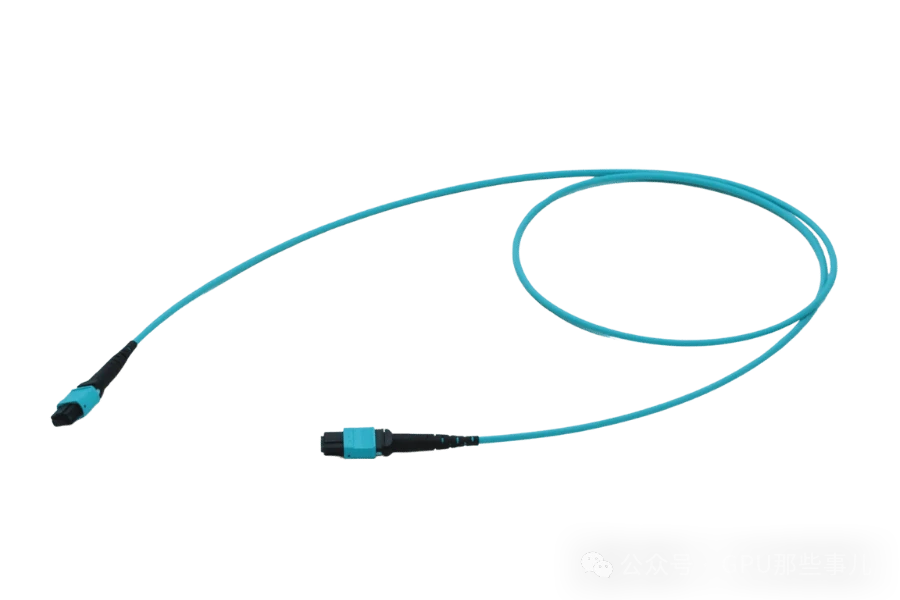
MTP Jumper Cables terminate with MTP connectors on both ends. Use them to link a fiber patch panel port to a switch transceiver, or to connect two optical modules directly. They come in both male (with guide pins) and female (without guide pins) configurations. Female-to-female jumpers with an adapter in between are the most common within-cabinet setup.
MTP Jumper Cables are compatible with QSFP+ (40G), QSFP28 (100G), QSFP-DD (400G/800G), and OSFP (400G/800G) transceivers. For direct transceiver-to-transceiver connections, always verify whether the transceiver port requires a male (with guide pins) or female (without guide pins) connector - most active transceiver ports are male, requiring a female cable end.
To help you determine which of the MTP Cable Types to select, here is a technical comparison table mapping their architecture, typical fiber counts, and deployment targets:
MTP Cable Type
Fiber Count
Connector Gender Configuration
Common Use Case / Network Target
MTP Jumper Cables
8, 12, 16, 24, up to 144
Female-to-Female (standard); Female-to-Male
Connecting transceivers (e.g., QSFP28/QSFP-DD) directly, or patch panel to switch ports.
MTP Trunk Cables
12, 24, 48, 72, 96, 144
Male-to-Male (standard with pins)
Primary structured backbone cabling between MDA and HDA distribution areas.
MTP Breakout / Harness
8, 12, 16, 24
MTP (Male or Female) on one end to LC/SC Duplex
Splitting 100G/400G parallel ports (e.g., SR4) into 4x 10G/25G or 8x 50G discrete duplex streams.
MTP Conversion Cables
24 (Base-12) to 3x8 (Base-8); 2x12 to 3x8
Female-to-Female; Female-to-Male
Upgrading legacy Base-12 trunk cabling to support newer Base-8 or Base-16 transceivers without fiber wastage.
MTP Trunk Cables are the backbone of the data center cabling plant. They carry high fiber counts, typically 48, 72, 96, or 144 fibers, inside a double-sheathed design that provides greater tensile and compressive strength than single-jacket assemblies. That durability makes them the right choice for long runs between equipment rooms, Main Distribution Areas (MDA), and Horizontal Distribution Areas (HDA). Trunk cables don't connect directly to optical modules. They terminate at patch panels or cassette modules, which then distribute individual fibers to active equipment.
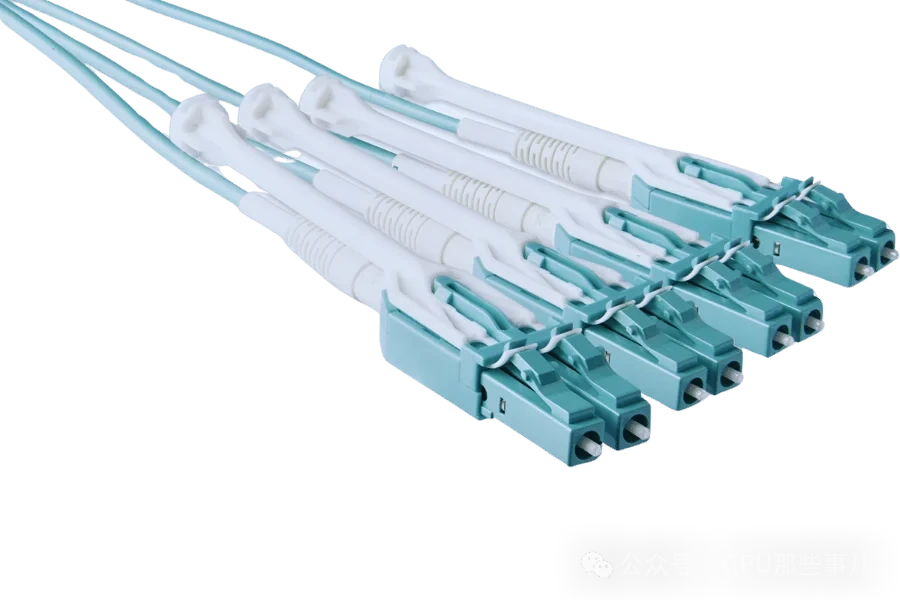
MTP Harness (Breakout) Cables are the fiber translation layer at the rack edge. One end carries an MTP connector with 8, 12, or 24 fibers. The other end fans out into multiple individual LC or SC duplex connectors. This design lets you connect a high-density MTP port on a switch to multiple servers or devices that use standard duplex interfaces. For example, one 12-fiber MTP connector fans out into six LC duplex connections, each carrying 10G traffic. That's a clean, organized way to split a 100G parallel optic port into six discrete 10G streams.
MTP Conversion Cables share the fanout structure of harness cables but focus on transitioning between fiber counts or connector types. A conversion cable might take a Base-12 MTP backbone and map it to a Base-8 infrastructure. This is particularly useful when upgrading a legacy network without having to replace the entire trunk system. Conversion cables eliminate one mated connector pair compared to cassette-based conversion modules, reducing insertion loss by approximately 0.15–0.35 dB per eliminated interface - a meaningful saving in tight link budgets at 400G and above, where the total optical path loss allowance may be as low as 3.5 dB (e.g., 400G-DR4).
To explore our full range of pre-terminated assemblies in every configuration, visit our MPO patch cords product page.
MTP Cable Standards: OM3, OM4, OM5, and Single-Mode Options
Selecting the correct fiber grade for your MTP Cable Types is non-negotiable: mismatched fiber and transceiver types cause link failure. The four available grades differ in bandwidth, reach, wavelength range, and jacket color. Use the table below to match your transceiver standard to the correct fiber:
Fiber Grade
Core Diameter
Modal Bandwidth
Max Reach @ 10G
Max Reach @ 100G
Max Reach @ 400G
Jacket Color
Typical Use Case
OM3
50 µm
2,000 MHz·km
300 m
100 m
Not supported
Aqua
Legacy short-reach; budget deployments
OM4
50 µm
4,700 MHz·km
550 m
150 m
100 m (SR4)
Magenta or Aqua
Enterprise & hyperscale standard
OM5
50 µm
5,000 MHz·km
550 m
150 m
150 m (SWDM4)
Lime green
AI/HPC, SWDM 400G/800G, fiber-constrained paths
OS2
8–9 µm
N/A (single-mode)
10 km+
10 km+
2 km (DR4)
Yellow
Long-reach; coherent optics; DR4/DR8 transceivers
OM3 Multimode operates at a modal bandwidth of 2,000 MHz·km. It supports 10GbE up to 300 meters and 40GbE up to 100 meters. OM3 is a cost-effective choice for smaller facilities or existing short-reach deployments that don't need to scale beyond 100G. For new builds targeting 400G or higher in the near term, it's worth moving to OM4 from the start.
OM4 Multimode is the dominant standard in enterprise and hyperscale data centers. It delivers 4,700 MHz·km of modal bandwidth, extending 10GbE reach to 550 meters and supporting 40G and 100G connections up to 150 meters. Its magenta or aqua jacket is universally recognizable in the field. OM4 is backward compatible with OM3 transceivers and supports a clean upgrade path from 100G to 200G without replacing existing cables. If you're building new data center infrastructure in 2025 and don't have specific AI-scale requirements, OM4 is almost certainly the right answer.
OM5 Multimode reaches a modal bandwidth of 5,000 MHz·km and is the only multimode fiber designed specifically for SWDM applications. SWDM multiplexes multiple wavelengths (from 850nm to 953nm) onto a single fiber pair, which means you can carry 200G or 400G traffic over fewer physical fibers. OM5 can reduce fiber count by up to 75% compared to OM4 for the same aggregate bandwidth when using SWDM transceivers. OM5 is identifiable by its distinctive lime-green jacket. For AI data centers deploying 400G or 800G fabrics with tight cable pathway constraints, OM5 is the forward-looking fiber investment.
OS2 Single-Mode uses a much smaller core diameter (8 to 9 micrometers versus 50 micrometers for multimode), which allows very low attenuation over long distances. 400G DR4 and 800G DR8 transceivers require OS2 single-mode fiber that meets ITU-T G.652.D specifications for consistent low-loss performance. Single-mode is also the standard for metro area networks and long-distance telecom links where multimode simply can't reach.
On jacket type: plenum-rated (CMP) MTP cables use materials that produce minimal smoke and resist ignition. They're required by NFPA codes for installations in air-handling spaces. LSZH (Low Smoke Zero Halogen) jackets are preferred for enclosed or underground environments, because they don't release toxic gases if they burn. Choose based on your local building code and the specific installation environment.
⚠️ Critical compatibility rule: Never mix UPC (flat-polish, multimode) and APC (8°-angled-polish, single-mode) connectors in the same link. The angled and flat endfaces cannot make proper physical contact, causing return loss values above 14 dB and rendering the link non-functional. APC connectors are always green-keyed; UPC connectors use aqua, magenta, or beige housings.
What's Inside an MTP Fiber Cable? Key Components Explained
Understanding MTP cable construction helps you evaluate quality, troubleshoot failures, and make more informed procurement decisions. There are six core components that work together to deliver the performance MTP cables are built on.
The optical fibers are the signal-carrying core. They transmit data as pulses of light. Multimode fibers use a 50-micrometer core that supports multiple simultaneous light paths, which is ideal for short-distance, high-bandwidth applications. Single-mode fibers use an 8 to 9-micrometer core that allows only one light path, drastically reducing signal dispersion for long-distance links.
The connector housing protects the ferrule and provides the mechanical framework for mating. MTP housings are built from reinforced polymers that resist heat, moisture, and physical impact. They're rated for more than 1,000 mating cycles without degrading performance. That durability is critical in live patching environments where connectors get plugged and unplugged frequently.
The alignment mechanism is what makes MTP connectors precise. Guide pins and a floating ferrule work together to ensure that every fiber lands exactly on its corresponding fiber at the far end. A misalignment of even a few micrometers causes measurable insertion loss. The floating ferrule in MTP connectors compensates for slight angular or lateral variation during mating, which is why insertion loss stays consistent across connections rather than varying from port to port.
Protective sleeves around each fiber defend against environmental contamination. Dust and moisture are the two leading causes of connector degradation in field-deployed cables. The protective sleeves provide the first barrier between the fiber and the environment.
The cable jacket forms the outer layer. PVC is standard for general indoor environments. LSZH is the right choice for enclosed, high-occupancy, or plenum spaces. Our MPO patch cords are available in both jacket materials, with LSZH used by default for most data center applications.
Strength members run along the interior of the cable alongside the fibers. Aramid yarn (Kevlar) is the most common material, though fiberglass rods are also used in higher-strength applications. These members absorb tensile load during cable pulling and routing, protecting the optical fibers from stretch forces that would otherwise permanently degrade signal performance.
MTP Cable Advantages for Modern Data Center Networks
The shift to MTP cables is an infrastructure decision with compound returns. The advantages show up immediately during installation and keep delivering value across the life of the network.
Faster deployment comes standard with pre-terminated MTP assemblies. There's no field fusion required. The cable arrives with factory-polished connectors, 100% tested to spec. You route the cable, push in the connector, verify the link, and move on. In a large deployment, the difference between field-terminated single fibers and pre-terminated MTP assemblies can mean days of installation time saved.
Signal integrity is where MTP sets itself apart from every legacy alternative. An insertion loss of 0.15 to 0.35 dB per connector means data arrives with minimal degradation. That performance translates directly into longer reach, higher throughput, and fewer retransmissions. For networks running financial applications, AI inference workloads, or real-time services, this level of consistency is not a nice-to-have.
Scalability is inherent in the modular design. Adding capacity to an MTP infrastructure means adding more trunk cables, more cassette modules, and more transceivers. The core cabling plant doesn't change. This is exactly the flexibility that growing AI data centers need, where traffic patterns shift rapidly and port counts scale unpredictably.
At COBTEL, we manufacture MTP and MPO cables in a vertically integrated production facility. Every cable is factory-polished and 100% optically tested before it leaves the floor. Connector quality at the ferrule level is what determines whether a link comes up on the first try. Our complete line of optical communication products covers MPO patch cords, optical transceivers, and fiber patch cords, so you can build a complete MTP cabling solution from a single supplier that controls every step of the manufacturing process.
How Do You Choose the Right MTP Connector for Your Network?
Choosing the right connector configuration for your MTP cable type requires aligning three variables with your specific transceiver standard:
1. Fiber Count (MPO-8, MPO-12, or MPO-16):
MPO-8 / Base-8: For 40G SR4 and 100G PSM4. Only 8 of the 12 ferrule positions carry active fiber.
MPO-12 / Base-12: For 40G SR4 (legacy), 100G SR4, and 100G PSM4. The most widely deployed backbone standard.
MPO-16 / Base-16: Required for 400G SR8, 400G DR8, 800G SR8, and 800G DR8. Becoming the new baseline for AI cluster fabric cabling.
2. End-Face Polish (UPC vs. APC):
UPC (Ultra Physical Contact): Flat, 0° polish. Required for all multimode links (OM3, OM4, OM5). Connector housing is aqua or magenta.
APC (Angled Physical Contact): 8° angled polish. Required for all single-mode links (OS2). Connector housing is green. Reduces back-reflections by >60 dB vs. UPC.
⚠️ Never mate UPC to APC - physical and optical incompatibility causes permanent connector damage.
3. Polarity Method (Type A, B, or C):
Polarity Type
Cable Orientation
Pin Configuration
Recommended For
Type A
Key-Up → Key-Down
Straight-through (Pin 1 → Pin 1)
Legacy duplex breakout; specific cassette pairs
Type B
Key-Up → Key-Up
Crossover (Pin 1 → Pin 12)
Standard for all 40G/100G/400G/800G parallel optic links
Type C
Key-Up → Key-Down
Pair-flipped (Pin 1 ↔ Pin 2)
Specific duplex LC transceiver configurations
⚠️ Critical rule: Commit to one polarity method across every trunk cable, cassette module, and jumper in the installation before ordering. Mixing polarity types within the same optical path brings the entire link down. Type B is the correct choice for virtually every modern parallel optic deployment.
Here's how to work through each decision:
Fiber Count: Match fiber count to your transceiver standard. MPO-8 is used for 40G SR4 applications where only 8 of the 12 ferrule positions are active. MPO-12 is the most common configuration in data centers today and supports 40G SR4, 100G SR4, and 100G PSM4 links. MPO-16 is required for 400G SR8 and 800G SR8 transceivers, where all 16 fibers carry active traffic across 8 transmit and 8 receive lanes. If you're building infrastructure today that will need to support 800G or 1.6T tomorrow, specify MPO-16 trunks from the start.
End-Face Polish: UPC (Ultra Physical Contact) is the standard finish for multimode OM3, OM4, and OM5 applications. APC (Angled Physical Contact) uses an 8-degree angled end-face that deflects back-reflections away from the fiber core, delivering better return loss performance. APC connectors are required for single-mode OS2 applications. Never mix UPC and APC connectors in the same link. Pairing them causes very high return loss and link instability that can be difficult to diagnose in the field.
Type B is the de-facto standard for new data center builds. It's the correct choice for 40G SR4, 100G SR4, 400G DR4, 400G SR4.2, and 800G DR8 parallel optic applications. Type A works for specific legacy duplex configurations and MPO-to-LC breakout setups where the polarity correction happens at the cassette. Type C is used in certain duplex network designs. The most important rule: pick one polarity method for your entire installation before you order, and maintain it consistently throughout every trunk, cassette, and jumper in the link. Mixing polarity types kills the connection.
For high-density environments, also plan for bend radius, thermal airflow, and long-term scalability from day one. A well-designed MTP system should support the next two generations of transceiver speeds without touching the fiber plant.
Our in-depth article on MPO MTP connector types and polarity walks through every configuration in technical detail, with lane maps for each speed tier. You can also pair MTP cables with our compatible
optical transceiversto build complete, validated cabling assemblies from a single source.
How to Install and Maintain MTP Cable
Proper installation and ongoing maintenance separate a high-performing MTP network from one that creates recurring troubleshooting headaches. Follow these steps during installation, and build maintenance into your operating procedures from day one.
MTP Cable Installation: Step by Step
Plan the route first. Map the complete cable path before you touch a single cable. Account for minimum bend radius (sharp bends cause signal attenuation that may not appear in initial tests but worsens over time), physical obstacles, cable tray capacity, and total cable length from patch panel to device. Identify which cable type belongs in each segment: trunk cables for backbone runs, harness cables at the rack edge, and jumper cables for patch panel to switch connections.
Lay cable carefully. Pull MTP cables through troughs and conduit without exceeding the minimum bend radius. Use cable management hardware, including trays, brackets, and Velcro ties, to keep runs organized. Avoid routing power and fiber cables in the same tray where possible.
Test every connection. Connect a calibrated optical light source to one end of each MTP cable and a calibrated optical power meter to the other. Confirm that the measured optical power falls within your system's link budget. For a more detailed view, use an OTDR (Optical Time Domain Reflectometer) to identify any faults along the fiber path, including micro-bends, contamination, and splice points that contribute to signal loss. If a connection fails the test, clean the connector end-faces and retest before concluding the assembly is faulty.
Label and document everything. Label both ends of every cable with a consistent, readable scheme. Document the complete installation: cable paths, termination points, fiber counts, polarity types, and all optical power test results. That documentation becomes critical during future upgrades, troubleshooting events, and compliance audits.
MTP Cable Maintenance: Key Practices
Inspect connectors regularly. Look for contamination, physical damage, or signs of wear at every scheduled maintenance window. Even a small amount of dust on a connector end-face can raise insertion loss beyond acceptable limits.
Clean before every mate. Use lint-free wipes, IPA-grade isopropyl alcohol, or fiber-specific cleaning pens. Clean every connector end-face before plugging it in, every time. Contamination introduced during a single mating event can degrade the link for its entire operational life.
Monitor optical power continuously. Set up baseline power readings after installation and compare against them during scheduled checks. A gradual drift toward the edge of your link budget is an early warning of connector degradation or contamination.
Protect cables from environmental stress. Keep MTP cables away from extreme temperatures, humidity, and physical pressure. Store unused cables with dust caps seated securely, in protective packaging or cable management enclosures.
Maintain a maintenance log. Record every inspection, cleaning event, test result, and corrective action with a date and technician ID. That history lets you identify patterns, plan proactive replacements, and demonstrate compliance with service agreements.
Tools you'll need: MTP cables and connectors, LC or SC cassette modules, fiber stripper, fusion splicer or precision cleaver for spliced runs, OTDR, calibrated optical power meter, optical light source, complete fiber cleaning kit (IPA, lint-free wipes, cleaning sticks), and cable labeling materials.
Conclusion
MTP cable types are the connective tissue of every modern high-speed network. The right combination of cable type, fiber grade, and polarity method determines whether your infrastructure keeps pace with 400G and 800G demands, or holds you back when speeds scale.
Three key takeaways: First, match cable type to role. Jumpers for within-cabinet connections, trunk cables for backbone runs, harness cables for parallel-to-duplex transitions, and conversion cables for legacy system upgrades. Second, choose fiber grade based on speed and distance. OM4 for most current enterprise deployments, OM5 for AI-scale density and SWDM applications, OS2 for single-mode medium-reach links. Third, commit to one polarity method (Type B for virtually all new builds) and enforce it across every component in the installation.
COBTEL has built end-to-end MTP and MPO cabling solutions for data centers running 400G, 800G, and 1.6T networks. Every cable ships factory-tested and fully verified. If you're speccing a new deployment, planning an upgrade, or need a custom configuration for a specific transceiver application, fill out the inquiry form at the bottom of this page and our engineering team will get back to you promptly.
Frequently Asked Questions
Q1:What is the difference between MTP and MPO cables?
A:MPO (Multi-Fiber Push-On) is the international standard for multi-fiber optical connectors, defined by IEC 61754-7 and TIA-604-5. MTP is a registered trademark of US Conec and is a premium-engineered version of the MPO connector. MTP adds a floating ferrule, elliptical guide pins, and a sliding lock mechanism that standard MPO designs don't include. The result is a lower typical insertion loss of 0.15 to 0.35 dB versus 0.35 to 0.75 dB for standard MPO. All MTP connectors are fully compatible with standard MPO hardware, so you can upgrade to MTP without changing your existing infrastructure.
Q2:Which MTP cable type should I use for a data center backbone?
Q3:What fiber grade is best for 400G applications?
A:The right fiber grade depends on the transceiver type. For short-reach 400G SR4 or SR8 modules, OM4 multimode is the standard choice for most deployments. OM5 is the better option if you're also deploying SWDM transceivers or building for 800G scale, because OM5 can reduce fiber count by up to 75% compared to OM4 for the same aggregate bandwidth. For medium-reach
A:Start by cleaning every connector end-face with a lint-free wipe and isopropyl alcohol. Connect a calibrated optical light source to one end of the MTP link and a calibrated optical power meter to the other. Measure the received optical power and confirm it falls within your system's link budget. For more detailed diagnostics, use an OTDR to identify specific faults along the fiber path, including contamination points, micro-bends, or damaged sections that cause signal loss. Record every test result for future reference, compliance documentation, and troubleshooting baseline comparisons.
Q5:Are MTP cables compatible with QSFP+, QSFP28, and QSFP-DD transceivers?
A:Yes. QSFP+ modules (40G) use MPO-12 connectors. QSFP28 modules (100G) also use MPO-12 in most parallel optic configurations. QSFP-DD and OSFP modules (400G and 800G) use MPO-12 or MPO-16, depending on the specific optical standard: SR4 uses MPO-12, while SR8 and DR8 use MPO-16. The critical requirement is that the fiber type (multimode or single-mode) and connector polish (UPC or APC) match the transceiver's optical specifications exactly. Always verify fiber and connector compatibility before deploying a new transceiver type in an existing MTP infrastructure.