Can a gigabit switch be connected to a 100Mbps network cable?
Leave a message
Many friends have asked whether a gigabit switch can be connected to a 100Mbps network cable. This issue has also been discussed among COBTEL's engineers before. In our home LAN, the transmission medium is typically 100Mbps network cables, and there is another commonly used one, the gigabit network cable. What are the differences in usage between the two? What are the differences in the practices of 100Mbps and gigabit network cables? Today, we will summarize the content of cable connections in this issue.
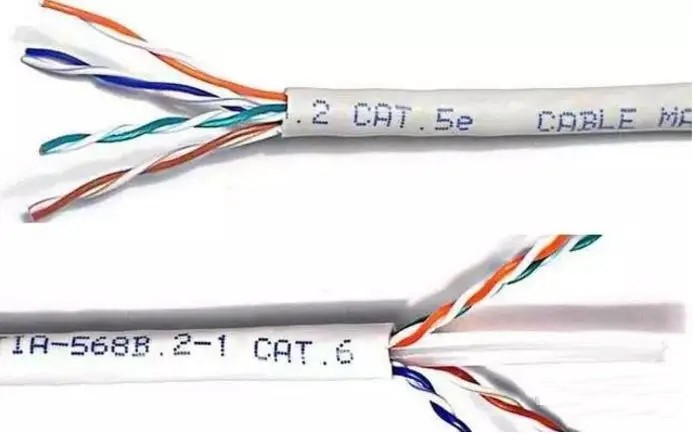
The Cat5E and Cat6 Cable structure Comparison
According to the classification of network cables, all network cables have type identifiers on their outer sheaths. CAT5 and CAT5E represent Category 5 and Category 5E cables, which are the 100Mbps network cables we refer to; CAT6 and CAT6A represent Cat 6 and Cat 6A cables, which are the gigabit network cables. In fact, gigabit can also use Category 5E cables, but we recommend using Category 6 cables because the quality and performance of the cables vary. Using Category 5E cables for gigabit is not very reliable.
In terms of usage, there is no difference between gigabit and 100Mbps network cables. Gigabit network cables are fully compatible with 100Mbps networks. Of course, the transmission rate of 100Mbps network cables is not as high as that of gigabit, so they cannot be upwardly compatible. That is to say, in a home network environment, both 100Mbps and gigabit network cables can be used. Using gigabit network cables eliminates the hassle of rewiring when upgrading home broadband, but they are significantly more expensive.
Here are a few common examples:
Gigabit main switch, connected to a gigabit sub-switch, uses Cat 6 cable (CAT6).
Gigabit main switch, connected to a 100Mbps sub-switch, uses Cat 6 cable (CAT6).
Gigabit main switch, connected to a new server, uses Cat 6 cable (CAT6).
Gigabit main switch, connected to an old server, uses Cat 5 (CAT5E), running at 100Mbps.
Gigabit sub-switch, connected to a new machine, uses Cat 6 cable (CAT6) if the budget allows, at least CAT5E.
100Mbps sub-switch, connected to an old machine, uses Cat 5E, if it already exists, it can remain unchanged; if the quality is too poor, it should be cut off and rewired with CAT5E.
In terms of data transmission methods, the core of a 100Mbps network cable is 8 cores, but only 4 of them are used for uploading and downloading, while a gigabit network cable needs to use all 8 cores.
As shown in the figure below, each network port has two green lights on the left and right. The left light indicates a 100Mbps rate, the right light indicates a 10Mbps rate, and both lights indicate a connection to a 1000Mbps device. Of course, the switch, network cable, and the device connected to the switch all support 1000Mbps, and the 1000Mbps light will only light up.

Additionally, the cores of a gigabit network cable are arranged with a cross-shaped plastic frame in the middle to separate the four groups of 8 cores. This is not present in 100Mbps network cables, which makes the practice of gigabit network cables more difficult.

So, the question comes up:
More than one friend has asked, can I use a gigabit switch with a 100Mbps network cable?
A gigabit switch can be connected to a 100Mbps network cable, but only 100Mbps can be used on this line, and it cannot reach gigabit level.
Both gigabit and 100Mbps network cables use the T586B standard. (Unless cross-over cables are needed between devices.)
To achieve gigabit speed when connecting to a gigabit switch, it is best to use Cat 6 cable. Cat 5 cable is not suitable, and Cat 5E cable depends on the quality of the cable and the transmission distance.
Are the methods for making RJ45 connectors for 100Mbps and gigabit network cables the same? The answer is yes, the methods are exactly the same.

However, when testing a gigabit network cable, it is necessary to test that all 1-8 wires are fully connected, because all 8 cores of a gigabit network cable are working.
Let's revisit the performance of Cat 6 cable:
Cat 6 cable: The transmission frequency of this type of cable is 1MHz to 250MHz. The Cat 6 cabling system should have a large margin of PS-ACR (Power Sum Attenuation to Crosstalk Ratio) at 200MHz, providing twice the bandwidth of Cat 5E. The transmission performance of Cat 6 cabling far exceeds that of Cat 5E standards and is most suitable for applications with transmission rates above 1Gbps. An important difference between Cat 6 and Cat 5E is the improvement in crosstalk and return loss performance. For new generation full-duplex high-speed network applications, excellent return loss performance is extremely important. The Cat 6 standard eliminates the basic link model, adopting a star topology with the required cabling distances: the permanent link length cannot exceed 90m, and the channel length cannot exceed 100m.
If you confirm that the hardware is functioning normally, try setting one or two gigabit ports to 100Mbps full-duplex or half-duplex for greater stability.