

Why the internet speed is slow in your home?
Nov 18, 2024
Leave a message
When you are surfing the internet at home, you often find that despite having a 50M fiber optic connection, the internet speed is still slow. What is the reason? This issue is encountered by most people.
So today, it is necessary to explain why the internet speed is slow. Let's take a closer look.
1. How does your home broadband access the internet?
Think of internet access like a water system with three main parts: the water source, the pipes, and your teapot.
The water source is the internet website you are accessing, the pipes are the operator's network, and the teapot is your home internet devices such as computers and tablets.
Getting that water to your teapot is actually a pretty complicated process. While you are enjoying the internet, the network needs to go through multiple procedures to reach your phone and computer. This process involves various aspects, as shown in the diagram below:

The blue and red paths in the diagram illustrate the data flow when you access an internet website.
First, the website you are accessing is hosted in the operator's IDC data center.

The data travels from the national backbone network to the provincial backbone network. If the website is hosted in another operator's IDC data center, an interconnection link between operators is also needed.

▲Core network router
The data navigates through various routers in the national, provincial, and city networks, then via SR/BRAS to the OLT in the access network...
Note:
BRAS: A new type of access gateway for broadband network applications. It acts as a bridge between the backbone network and the broadband access network, providing basic access methods and management functions for the broadband access network. It is located at the edge of the network, providing broadband access services, aggregating and forwarding various services, and meeting the requirements of different users for transmission capacity and bandwidth utilization. Therefore, it is the core equipment for broadband user access.
SR: Refers to a full-service router, similar to BRAS, used to terminate and manage user PPPoE/IPoE sessions. BRAS serves as the entry point for traditional internet services, while SR serves as the entry point for new premium services. This architecture is the current situation in most city metro networks in China.
OLT: Optical Line Terminal (OLT), the device that connects to the main optical fiber line.

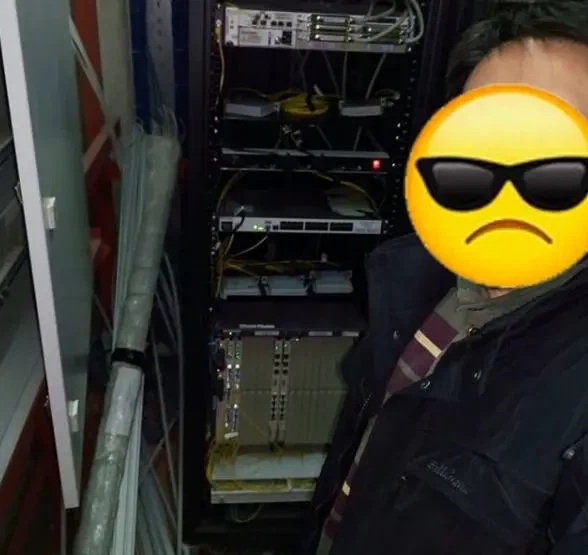
▲OLT equipment
Then, through the optical splitter, which divides the signal to multiple devices, it connects to the ONU, and then to the WiFi router, which wirelessly transmits the data to your computer, tablet, or phone.
And now, you're finally online. Behind this, there are countless communication devices and a group of hardworking communication maintenance engineers...
Now, based on the water flow path, let's see what affects your internet speed.
Simply put, the main factors affecting user internet speed involve the user end, the network, and the website. Any issue in these three areas can cause internet access problems.
2. User end issues causing slow internet speed.
The user end refers to the section from the WiFi router to the internet devices such as computers, tablets, and phones. Based on user complaints, over 90% of complaints about "slow internet speed" are caused by user end issues.
The broadband operator is like the water company, delivering water to your home, while the WiFi router is like the internal plumbing that connects to your faucets and showerheads. Unlike the water company, even if something goes wrong with your 'internal pipes,' the operator's techs will do their best to fix it. But if there's a problem with your faucets or showerheads, they can't help, and you need to replace them with better quality equipment.
These issues mainly include:
2.1 Old and low-performance hardware on the terminal internet devices.
If the computer's network adapter is poor or the memory is insufficient, it will result in not reaching the maximum internet speed. For example, if the broadband is upgraded to 200M but the computer's network adapter is still 10-100M, the internet speed will not meet the standard.
2.2 Software issues on the terminal devices:
such as too many browser plugins, computer viruses, or trojans, which can affect the internet speed.
2.3 Improper configuration:
such as incorrect DNS configuration. Incorrect DNS configuration by users may cause cross-operator or cross-region access, leading to slow internet speed. This often happens when users switch to other operators. The correct method is to use the local operator's DNS address on the computer or router. If you're unsure about your local DNS, you can auto-detect it or call your ISP for help.
2.4 Cable issues:
such as damaged, old, or poor-quality network cables or ethernet connectors.
2.5 WiFi router issues:
WiFi router issues are a common cause of slow internet speed. Here are some suggestions to make your WiFi run smoothly and speed up your internet:
① Choose the correct installation location
If your home WiFi is too slow, don't panic. Take a deep breath and look at the light bulb in your home. If you want every corner of the room to be illuminated, where would you install the light bulb?

Think of your WiFi like a light bulb: for better coverage and speed, place it in the best spot possible.
Check out this diagram showing how WiFi signals travel...

You can see that WiFi signals not only suffer from wall reflections but also weaken as they are blocked by walls or other obstacles. The blind spots where indoor signals cannot reach are clearly visible.
Therefore, if you want a fast internet speed, especially to enjoy high-definition IPTV, give your WiFi router some privileges, just like when you bought a beautiful painting and hung it in the most prominent place in the living room, rather than in a corner or hidden in a closet.
In addition, WiFi works using radio waves, and any electronic device that may emit radio waves can interfere with your WiFi connection, such as TVs, microwaves, and cordless phones. Try to keep your WiFi router away from these devices.
② Choose the WiFi router wisely
a) Why is the 5G signal's penetration through walls worse than the 2.4G signal?
At the same distance from the router, the 5G signal is weaker than the 2.4G signal, which is determined by the physical characteristics of electromagnetic waves: the longer the wavelength, the less it attenuates and the easier it is to bypass obstacles and continue to propagate. The 5G signal has a higher frequency and shorter wavelength, while the 2.4G signal has a lower frequency and longer wavelength. Therefore, 5G signals weaken more when passing through walls compared to 2.4G. All dual-band wireless routers, which support both 2.4G and 5G frequencies, have this situation.
Note: The following are the attenuation formulas for 2.4G and 5.8G in free space propagation (where F is the frequency in MHz and D is the distance in km)
Attenuation formula for wireless electromagnetic waves in free space: L=32.5+20lgF+20lgD.
Attenuation formula for the 2.4G band: L1=100+20lgD;
Attenuation formula for the 5.8G band: L2=108+20lgD.
Attenuation formula for the 2.4G band: L1=100+20lgD;
Attenuation formula for the 5.8G band: L2=108+20lgD.
These formulas show that 5.8G signals attenuate more than 2.4G, covering a shorter distance.
b) If the 5G signal is weaker than the 2.4G signal, will the internet speed be slower?
Not necessarily. Your internet speed depends not just on signal strength, but also on channel quality. After passing through a wall, the 2.4G band may have 3 bars of signal, while the 5G band may only have 2 bars of signal. If there is too much wireless interference around, watching videos on the 2.4G band with 3 bars of signal often buffers, while watching videos on the 5G band with 2 bars of signal is smoother. For some applications with high requirements for internet speed and latency, such as downloads, voice, and real-time games, using the 5G signal is more suitable.
c) What are the advantages and disadvantages of 2.4G and 5G WiFi?
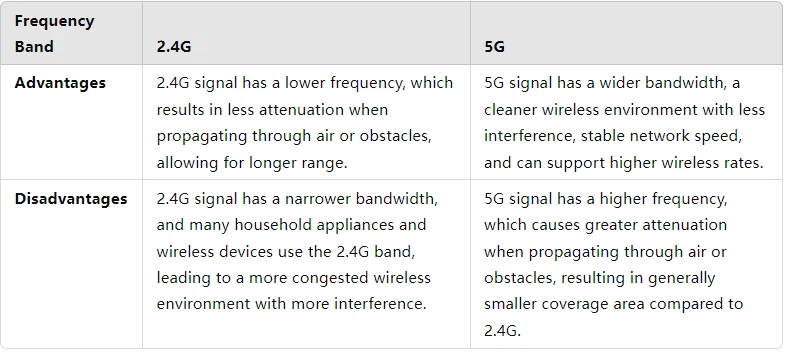
the advantages and disadvantages comparison of 2.4G and 5G WiFi
d) Which frequency band is more suitable?
From the above comparison, we can see the advantages and disadvantages of the 2.4G and 5G bands, but they are not mutually exclusive. Most usage environments are complex, with various terminals and a large number of connections, so using both bands together can maximize the wireless advantages. If you are a home user, it is recommended to choose a dual-band router. Network TVs, laptops, and other less mobile devices can choose the most suitable band between 2.4G and 5G; mobile terminals can use different bands in different locations to take advantage of each band's strengths.


