Difference between cable managers and patch panels
Leave a message
1 What is a cable manager?
Literally speaking, a cable management rack is a support structure for organizing cables and is typically used in conjunction with a patch panel. The cable management rack is not directly related to network transmission but mainly simplifies the planning of cross-connection systems facilitates cable management and offers benefits such as avoiding cable tension on modules, organizing cable routing, reducing signal loss and interference, and forming a maintainable wiring system. The size of the cable management rack is represented in U (rack units), and common sizes include 1U, 2U, 5U, 42U, 45U, and so on.

The cable management rack serves the purpose of securing, bundling, and organizing cables, which results in neat and tidy cables within the server cabinet, enhancing the overall appearance.
In previous construction projects, cable ties were often used to bundle cables, which could maintain cable neatness and appearance to some extent. However, there was a hidden risk associated with this approach. The tension generated by the cables could easily loosen the connections at the module interfaces on the patch panel, leading to poor contact and network failures. The use of a cable management tray largely solves this problem because it provides support to cables, preventing them from exerting force on the modules.
The image below shows a close-up view of the cable management rack after installation:
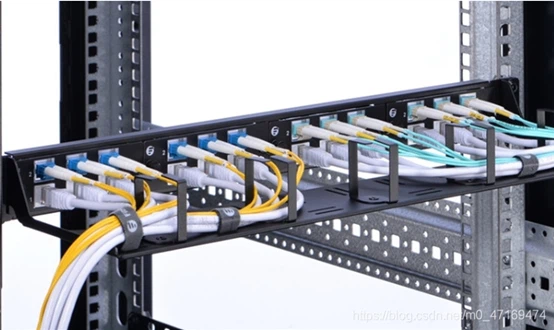
[Image: Close-up view of installed cable management rack]
The image below shows the overall effect of the cable management tray after installation:
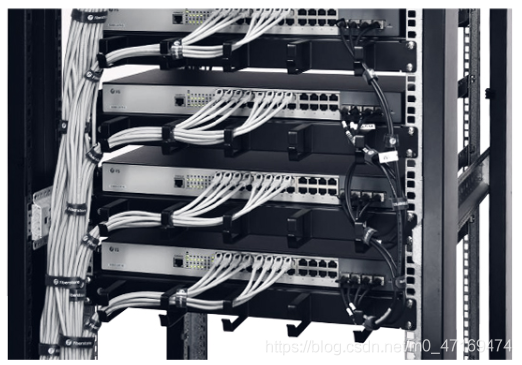
[Image: Overall effect of installed cable management rack]
2 What is a Patch Panel
A patch panel is a device used for cable termination and connection, typically serving as a hub component for interconnecting subsystems in a comprehensive building cabling system.
There is a common misunderstanding that without a patch panel, network communication would be impossible. This is a common misconception among individuals who are new to structured cabling. It's important to note that a patch panel is a component of the cabling system, not a communication device of the network system itself. The network can function properly even without a patch panel.
So, what would happen without a patch panel? Let's consider the following scenario: on a specific floor of a building, particularly the floor where the server room is located, if a patch panel is not installed, many user terminals and switches would be directly connected with network cables, making management highly inconvenient. In case of cable faults, it would even require rewiring.
Patch panels can be classified based on the medium and include categories such as twisted-pair patch panels, copper cable patch panels, fiber optic distribution frames (ODF), 110-type voice patch panels, etc., each used for terminating different types of cables.
The image below shows a twisted-pair patch panel:

[Image: Twisted-pair patch panel]
Now let's take a look at the effects of patch panels and cable termination:
The image below shows the effect of a patch panel and cable termination:

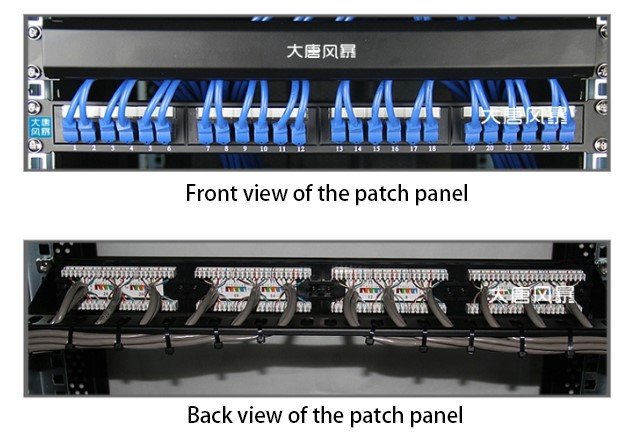
[Image: Effect of the patch panel and cable termination]
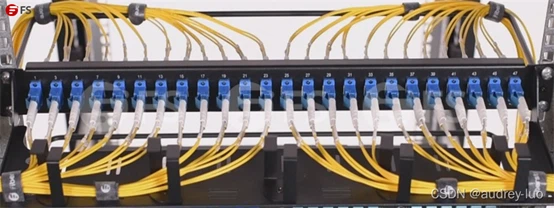
The image below shows a fiber optic distribution frame (the ports of the fiber optic distribution frame vary depending on the type of fiber optic connector used):
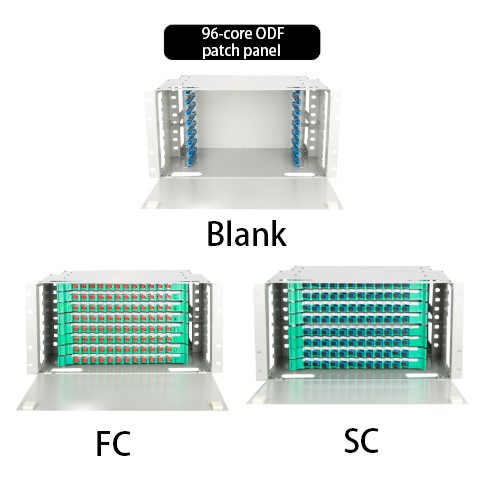
[Image: Fiber optic distribution frame]
3 Next, let's discuss the principles of patch panels and cable termination:
Based on the previous section's content regarding the termination process of large-count cables, we can summarize the principles of patch panels and cable termination as follows: The cables are pressed into the base in a chromatographic sequence, and the connecting block is pressed onto the base using a punch-down tool to establish electrical continuity with the copper cores of the cables inserted into the base.
Specification of patch panels: Twisted-pair patch panels primarily come in two specifications: 24 ports or 48 ports. The front panel is used to connect to the RJ-45 ports of patch panels, while the rear panel is used to connect the twisted-pair cables extending from the sockets. If shielded twisted-pair cables are used during the cabling process, the corresponding patch panel should also be a shielded twisted-pair patch panel to ensure the integrity of the shielding system.
4 Fiber optic patch panels:
The fiber patch panel is an important component of cable management systems, making it more convenient for the installation system to be mobile, modified, and maintained. Fiber optic distribution racks are suitable for managing jumper cables of different fiber optic interface types and are typically categorized as LC fiber optic distribution racks, SC fiber optic distribution racks, and MTP/MPO fiber optic distribution racks.
5 The installation of patch panels
The height of patch panels is measured in rack units (U), where 1U is approximately 1.75 inches in height. Patch panels are typically installed in a rack-mounted manner, mounting them on the frames of distribution cabinets, which are generally 19U in height.
When installing patch panels on a cabinet, it is not randomly placed but chosen according to the entry position of the cables into the cabinet. If the cables are routed from the floor and enter the cabinet from the bottom, the patch panel should be installed in the lower part of the cabinet. If the cables are routed overhead and enter the cabinet from the top, the patch panel should be installed at the top. In summary, the convenience of patching between the patch panel and the switch should be considered.
6 Installation Steps for Using Cable Manager with Fiber patch panel
Here are the installation steps for using a cable manager with a fiber patch panel
A. Secure the cable manager and the 1U fiber optic distribution panel together using screws.

B Place the fiber optic adapters into the 1U fiber optic distribution panel and secure them with screws. One 1U fiber optic distribution panel can accommodate four 12-core LC adapter panels.
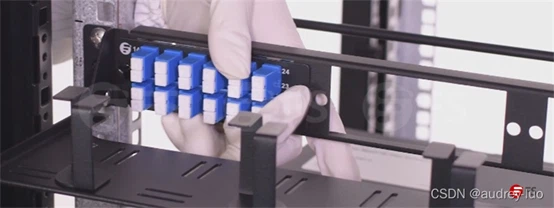
C Insert the LC fiber optic jumpers into the front panel of the fiber optic distribution rack. It can accommodate a total of 48 fiber cores.
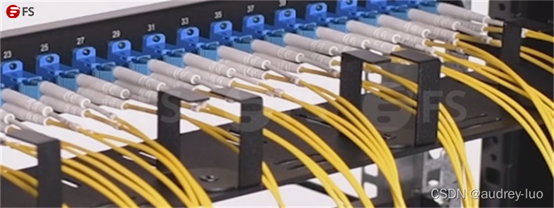
D Use the cable manager to organize and secure the cables with zip ties.