Cable Management Tools and skills in data centers
Apr 24, 2024
Leave a message
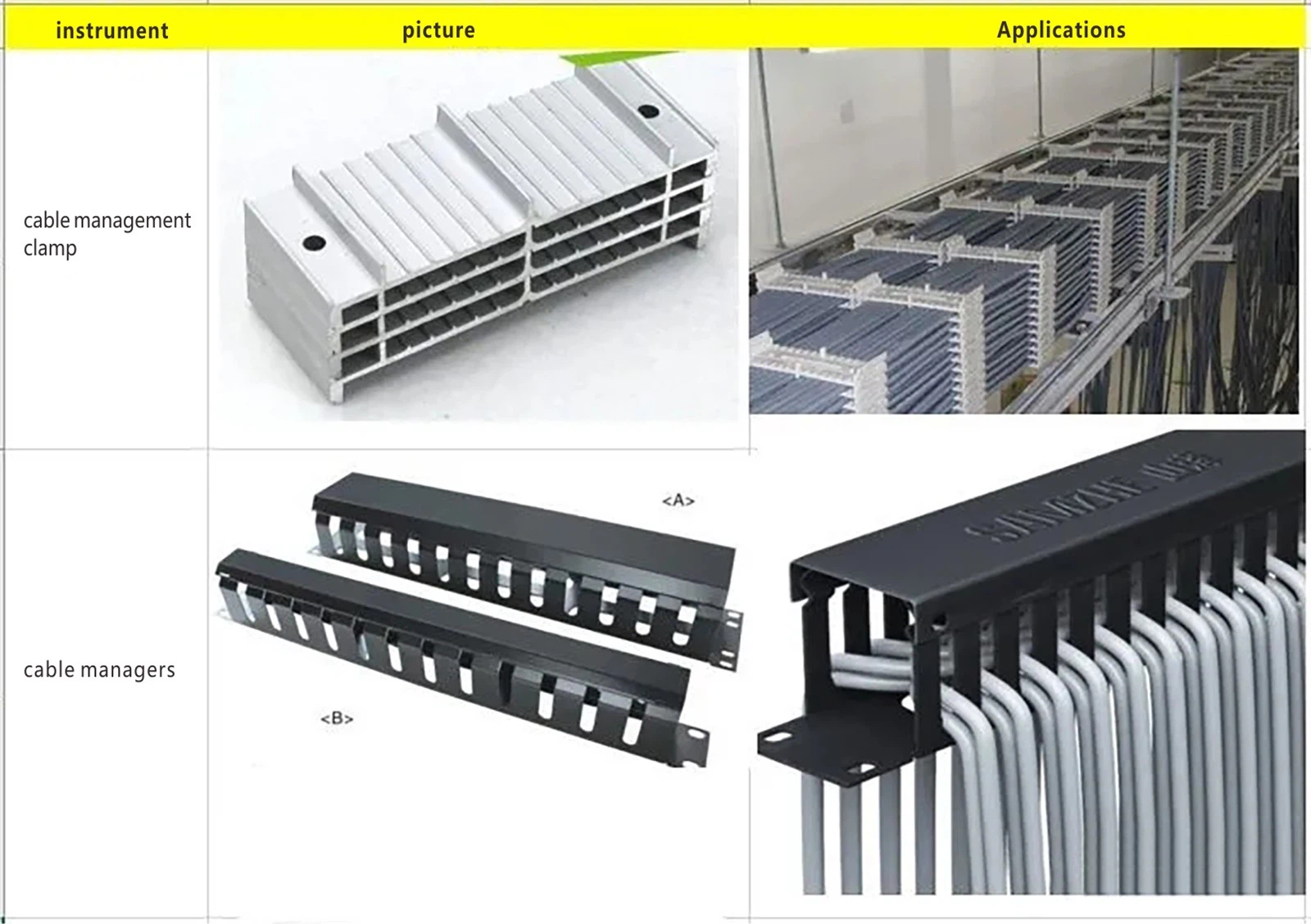
1 Cable Management Tools
Tools: cable management clips, cable managers, cable tray fasteners, cable clips, cable ties, electrical tape, RJ45 connectors, and a complete set of cable processing equipment.
Especially Important: Labeling tags
2 Basic Methods
2.1. Use tools for cable management instead of hands.
2.2. RJ45 connectors must seamlessly fit with the network cables.
2.3. Opt for cable clips over cable ties whenever possible.
2.4. Labels must be affixed properly.
3 Cable Routing Skills
The way cables are managed in a server cabinet is largely determined at the design stage of the cabinet's structure. For standard cabinet cabling, there are several techniques:
3.1. Use cable management racks. Basically, these are 1U or less sheet metal pieces with N number of teeth of varying lengths, depending on the size of the networking equipment and the required bend radius for the cables.
3.2 Utilize cable bridges. These are protruding, bridge-like structures within the server rack that help manage cables. Common locations for cable bridges include cabinet partitions, uprights, and square-hole mounting strips where devices are installed.
3.3 Employ cable winding reels. Similar in concept to cable management racks, these are typically used to organize optical fibers for communication equipment.
3.4 Make good use of cable grommets when routing cables. A cable grommet refers to the designated cable routing spaces on partition plates within different compartments of a cabinet. They are usually found where two isolated compartments meet, such as where equipment and battery compartments are separate.
3.5 Use cable ties and labels. As mentioned earlier in the basic methods, this is important for easy cable identification and maintenance, with the flexibility of cable ties and the clarity of labeled cables.
3.6 Next, we'll look at the cable management and labeling process in the data center:


4. Cable Routing Standards Inside the data center.
Within the same IDC (Internet Data Center), using the same network rack specifications, cable management should be consistent to facilitate routine operations and maintenance. Core network devices, internal network access devices, and management network access devices should all have neatly arranged cables. Optical fibers and ethernet cables should not obstruct the air vents of network devices. Cables should not be left too long at the bottom of the racks; labels on optical fibers and ethernet cables must be clear. The practice of inserting fibers and ethernet cables on the front side of the network devices should remain uniform. Use cable ties (not the fixed white type) to bundle the cables neatly at the rear side of the devices, keeping power cables and network cables organized and separated to maintain a sense of coherence.
4.1. Core Equipment Cabling Standards
For core network equipment in the IDC, especially internal core devices connected to a high number of TORs (Top-of-Rack switches), there will be more optical fibers. The arrangement of these fibers must be tidy and not crisscross at random. Keeping the cabinet neatly wired is one of the key points in the network equipment cabling standards. The installation diagram demonstrates of fiber optic cables:


Optical fibers should be vertically routed from either the left or right side of the device, ensuring not to block the vents. Fibers should be bundled with Velcro ties at intervals(Note: Do not use white zip ties), without being too tight and maintaining bend radius between 100 to 130 degrees, typically around 110 degrees. This allows slack for easy handling. Labels should be affixed clearly and should not block visibility when connected to device ports.
4.2 Internal Network Access Cabling Standards
Internal network access switches are positioned at the top of the rack. The 40G MPO fibers of internal TOR switches are uplinked to the core of the internal network, while 10G-AOC cables are downlinked to servers. ILO switches with 1G or 10G ports are uplinked to the management network core, with gigabit ports downlinked to servers. Two cabinets within the data center share one internal TOR and one ILO access switch (employing 5-meter cables within the same network cabinet and 8-meter cables for adjacent ones), with approximately 18 servers placed in each cabinet. The indicative diagram shows the arrangement of network cables and fiber optic cables:

The cables from the internal access switches are organized by a cable manager, bundling every four network cables with ties, each labeled uniquely. Optical fibers should not have excessive lengths and maintain an appropriate bend radius with clearly affixed labels, distinguishing fibers uplinked to different cores by using different colored labels.
4.3 Cable Tray Cabling Standards
Interconnecting cables between network equipment within the data center require cable tray routing (except within a single cabinet). The indicative diagram of fiber routing within cable trays is as follows:

As shown, optical fibers and ethernet cables within the cable tray should be laid out separately and neatly, bundling them periodically with zip ties to retain an aesthetic arrangement.
4.4 Server Cabinet Interior Cabling Standards
Inside the cabinet (regular server cabinets), there are mainly internal network AOC cables, ILO management network cables, and power cables. Consequently, there's a significant number of cables within a single cabinet, and each type of cable must be tidily strapped and routed on the sides of the cabinet. The following images illustrate:


Different cables are distinguished by different colors, e.g., internal network cables: blue, ILO cables: gray, power cables: black. Reserved cable lengths should not be excessive-just enough to reach from one side of the PDU to the other, as excessive lengths can complicate management and have a bad impact on cabling burying. The cable routing and bundling requirements between two servers are as presented in the images below: (since ethernet cables can cause electromagnetic interference, it's essential to segregate power cables from network cables).