

Ethernet switches:5 networking methods
Apr 23, 2024
Leave a message
Let's take a look at the five networking methods for switches.
1. For small networks:
Networks with around 100 users are considered small to medium-sized business networks. A common question arises: does a network with 100 connections require a core switch?
Generally, networks with fewer than 50 connections do not need a core switch; a 2 layer switch combined with a router should suffice. However, a network with 100 connections, typical for a small to medium-sized network, experiences moderate load-there is always a possibility of data latency occurring.
Core switches are usually layer 3 switches, providing efficient routing, VLAN segmentation, and other network management features. Layer 3 core switches realize IP routing via hardware, and their optimized routing software enhances routing efficiency, solving the speed issues of traditional software-based routing. Another important function of 3-layer switches is to connect subnets efficiently without compromising speed.
They also offer good expandability, as various expansion module interfaces are reserved. If devices need to be added later on, the network layout and existing devices don't need to be changed; you can simply expand your setup, protecting your initial investments.
Therefore, for such small to medium-sized networks, our networking solution is:

In this plan, each office is assigned to an independent VLAN with a separate subnet, utilizing layer 2 switches for the access layer. A medium-sized layer 3 switch serves as the core switch to forward data across subnets, with the firewall operating to connect to the internet after address translation.
Each layer 2 switch accommodates around 12 users, and every port on the medium-sized layer 3 switch is assigned to different VLANs. This ensures data separation between offices, effectively increasing internet speeds for each office. Data transfers between offices are handled by the layer 3 switch, preventing packet loss thanks to the switch's line-rate forwarding performance.
It's recommended that the layer 2 switches used here have at least 16 100M Ethernet ports-more if possible. However, if the monitoring cameras have high bitrates, 100M switches may be insufficient.
This network plan does not include aggregation layer devices due to the small scale of the network, which eliminates the need for them.
2 For medium-sized enterprise networks:
We classify networks with 300-800 users as medium-sized enterprise networks. It becomes challenging to manage networks once they grow in size-it's no longer practical to use the small network configuration. For such networks, we can use the following configuration:

As the number of users increases, we continue to use layer 2 switches purely for access. We introduce a new device (layer 2 aggregation switch) for aggregation.
Let's elaborate on the role of the aggregation layer:
The aggregation layer serves as a focal point for multiple access layer switches, managing all traffic from those devices and providing uplinks to the core layer. Thus, compared to access layer switches, aggregation layer switches require higher performance, fewer interfaces but greater switching rates.
The aggregation layer serves as a focal point for multiple access layer switches, managing all traffic from those devices and providing uplinks to the core layer. Thus, compared to access layer switches, aggregation layer switches require higher performance, fewer interfaces but greater switching rates.
The primary functions of the aggregation layer include:
Aggregating user traffic from the access layer, and handling data packet transmission, forwarding, and switching;
Based on access layer user traffic, carrying out local routing, filtering, load balancing, QoS priority management, security mechanisms, IP address translation, traffic shaping, multicast management, and more;
Directing user traffic to the core switch layer or routing locally based on processing results;
Handling various protocol conversions (like routing summarization and redistribution), ensuring core layer connections can run regions with different protocols.
Connections between layer 2 aggregation switches and layer 3 switches should utilize gigabit lines to minimize latency that could arise from an increased number of devices involved in the network data transfer.
Layer 2 aggregation switches should have numerous 100M Ethernet ports (to aggregate multiple layer 2 switches) and several gigabit Ethernet ports (for high-speed uplink capabilities). These switches should support full line-speed forwarding and features like IEEE802.1q, port aggregation (Trunk), port rate control, priority queue management, etc., to meet specialized requirements under various access situations.
3. Medium-to-Large Enterprise Networks
For enterprise networks with a user count exceeding 1,000 but less than 3,000, our networking solution is as follows:

At first glance, the network topology might seem complex, but upon closer examination, the principle is the same as the medium-sized network we discussed earlier. As the scale of the network further expands, relying on a single layer 3 switch as the network's core may reduce the network's processing performance. There could be a strain with potential for insufficient resources.
All user-generated traffic reaches this device, meaning it has to process a vast number of protocol data units. Therefore, if such a large-scale network still only uses one core device, its CPU will be incredibly busy. This results in increased latency in responding to user data, giving users the impression that the network has slowed down. Hence, adding another layer 3 switch to share the load is necessary, which explains the presence of multiple layer 3 switches in the network.
For connections between layer 3 switches, we can aggregate multiple gigabit links to form a higher-speed connection. This ensures that data is not blocked between the layer 3 switches, maintaining the network's high-speed exchange characteristics.
4. Large Enterprise Network Configuration
When the number of users exceeds 5,000, we classify it as a large enterprise network. Our configuration for such a network is as follows:
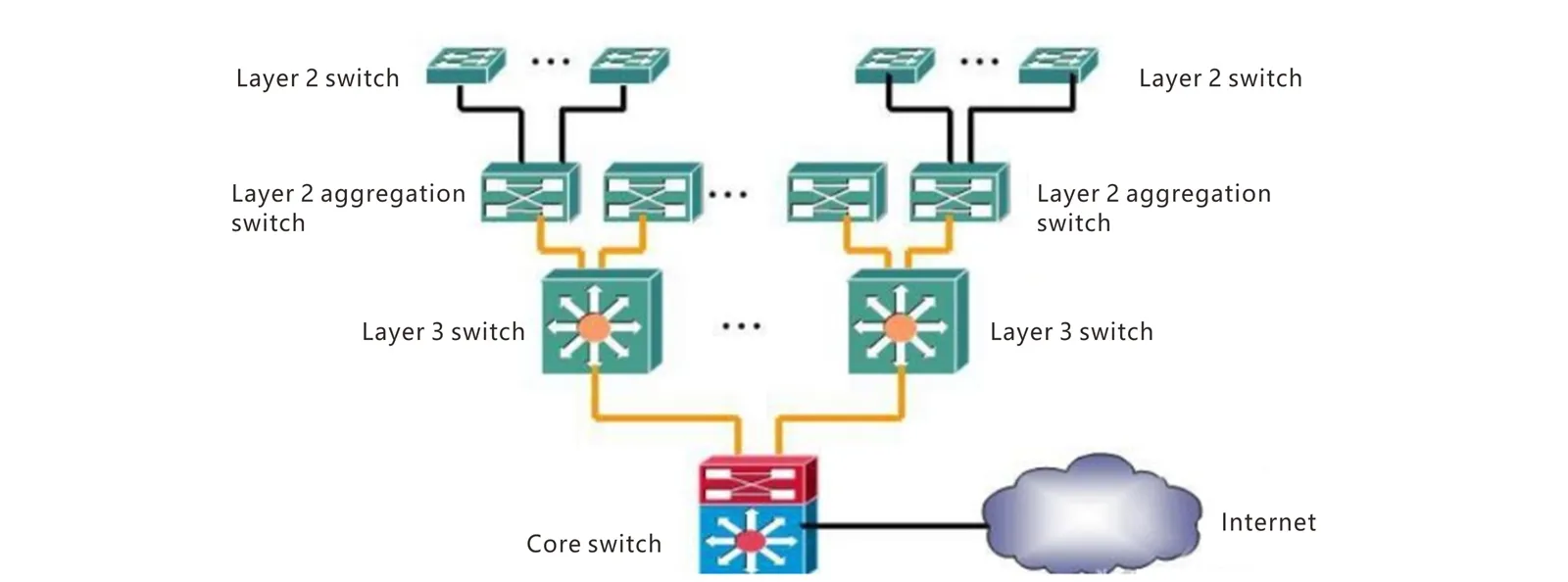
Upon analyzing this topology, we note the introduction of more switches. For such a large-scale network, using multiple (such as more than four) layer 3 switches as core devices would increase the data exchange latency. Some data might need to traverse all the layer 3 switches, including delays from layer 2 access and aggregation switches, leading to excessive forwarding delay and thus a slower network.
Therefore, the introduction of large switching devices (core switches or core routers) is necessary to reduce the number of devices that data must pass through.
Core switches (or core routers) typically have robust capabilities, allowing them to connect directly to the internet. If the enterprise network requires a high level of security, dedicated firewall equipment can be used between the core switch and the internet.
As for the access layer, whether to choose 100M or gigabit switches can be determined by user bandwidth demand, which has been previously covered.
5. All-Optical Network Configuration
For large campuses or building networks, we can not only use the traditional switch networking methods mentioned above but also employ all-optical networks.
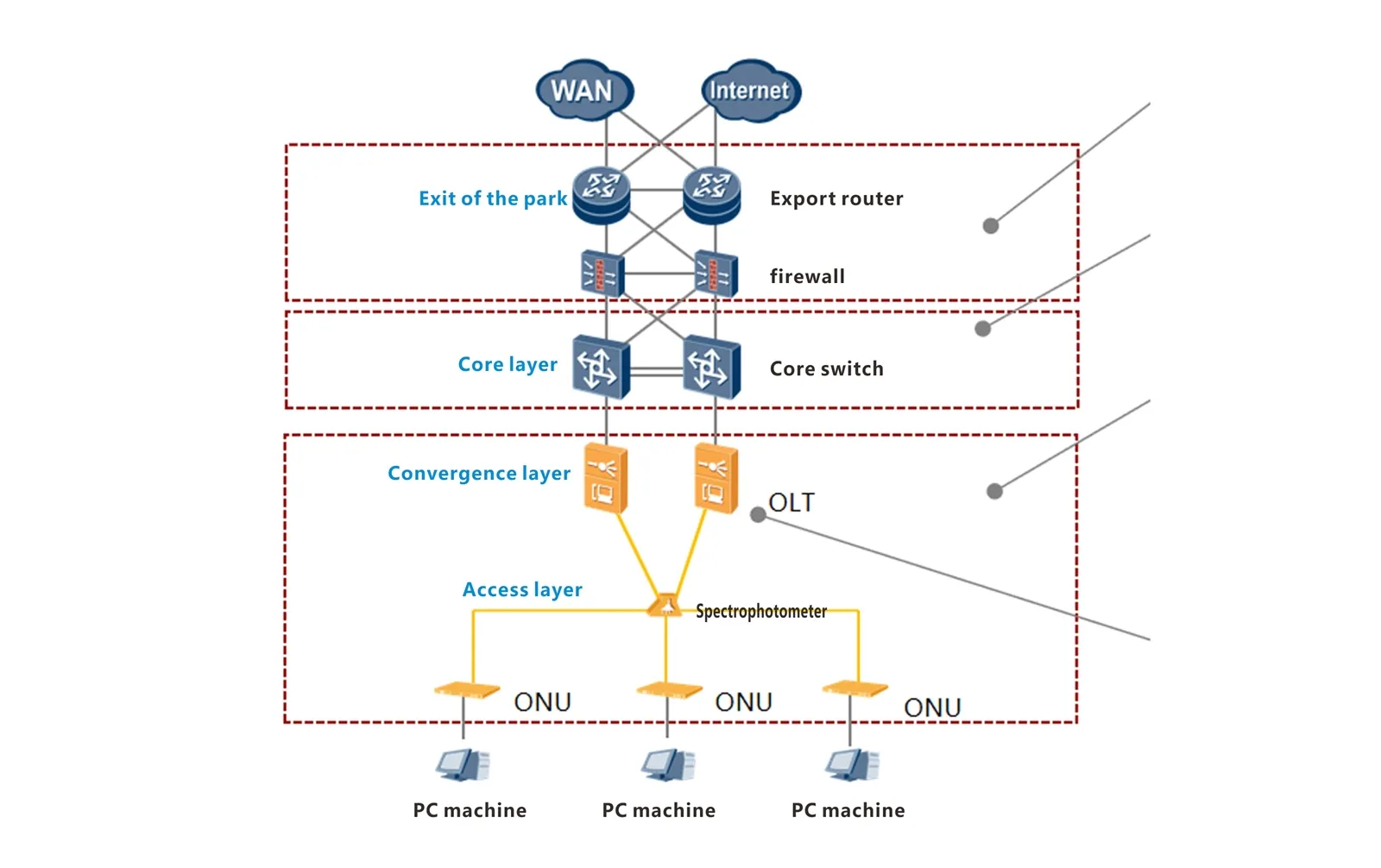
Campus All-Optical Network
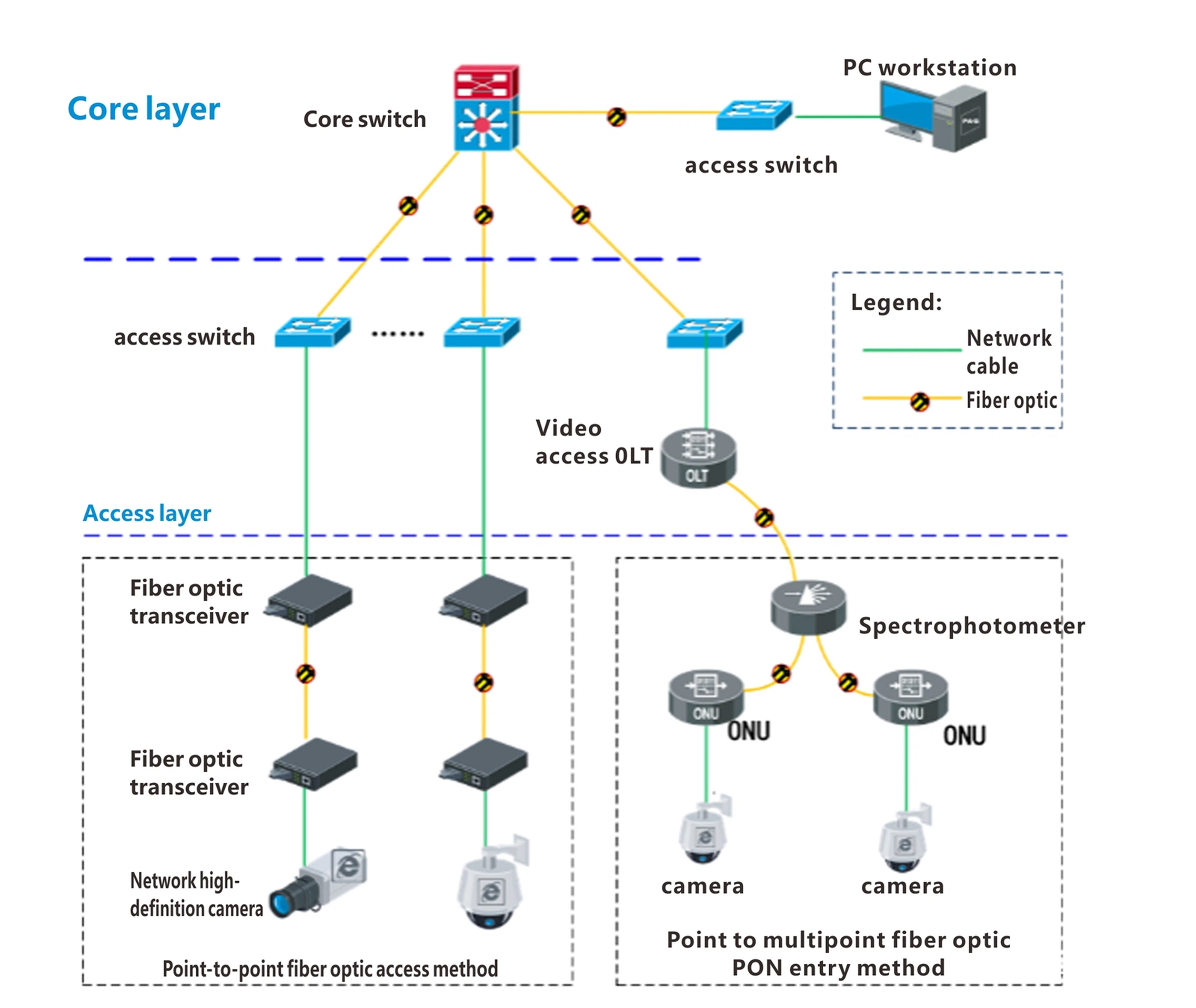
All-Optical Network for Network Monitoring Projects
An all-optical network uses all-fiber connections with a flattened network hierarchy, allowing unified multi-service access for offices.
The bandwidth of each ONU can be dynamically adjusted between 2M to 1Gbps, with an average uplink bandwidth of around 30M per ONU, meaning one OLT port can carry about 240 video stream channels (via the main fiber).
Save: Optical splitters replace aggregation switches, offering a passive system that is maintenance-free and saves space.
Reach: GPON fiber covers long distances up to 20KM without relays.
Speed: The flat network design offers direct, one-hop, low-latency communication.
Ease: Centralized device configuration and management, with automatic service provisioning and plug-and-play capabilities.
Reach: GPON fiber covers long distances up to 20KM without relays.
Speed: The flat network design offers direct, one-hop, low-latency communication.
Ease: Centralized device configuration and management, with automatic service provisioning and plug-and-play capabilities.


