1. In the 1st issue, we will introduce the Best Crimping Plier, best wire stripper,best Punch tool and accessories for making network cables.
1.1 Best Crimping Plier,Wire stripper and PunchTools for Making Network Cables and Connectors.
When it comes to tools for making
network cables, the first thing that comes to mind is the
best crimping plier, which we often simply call the network cable plier. Besides crimping pliers, there are also wire strippers. In wiring sites, many people use utility knives as wire strippers, which can work but require a lot of experience. If possible, it's better to use a
wire stripper.
The COBTEL Multifunctional 2-in-1 stripping and crimping plier
Another type of tool is used in the process of making
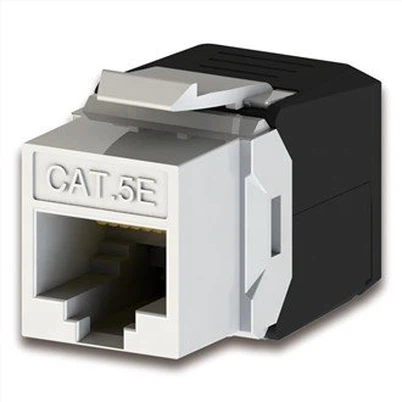
keystone modules, specifically for inserting the stripped
network cables into the
keystone modules, known as a
punch-down tool. Many manufacturers now combine the functions of wire strippers and punch-down tools into a single multi-functional tool for convenience. Below, we will detail the considerations when selecting these tools.
COBTEL multi-functional wire strippers and punch-down tools
1.2 Multi-functional Network Cable Crimping Plier
A crimping plier is a tool used to crimp network cable connectors and sockets. It usually has two slots, one for
RJ45 sockets and the other for
RJ11 sockets, helping engineers to precisely crimp network cable connectors and sockets to ensure stable signal transmission. There is also a type called "110 block scissors," which helps engineers cut the remaining cable of the network connector and socket for a neat appearance.
In addition to the traditional plier-shaped crimping pliers, there are now many ergonomic designs like the one shown below. They are easier to use, supporting 8P/RJ45 and 6P/RJ11 interfaces, as well as wire cutting and stripping functions. The various markings are clear, making it easy for anyone to use.
Many crimping pliers are reinforced with alloy carbon steel for the body, which is then painted to provide anti-oxidation and anti-rust properties. Combined with an ergonomic, one-piece matte handle, they offer a good grip and prevent slipping. They are designed for crimping 6P and 8P connectors.
It's also worth noting that many crimping pliers, although not explicitly stated, are primarily used for making connectors and
network cables for CAT5 and
CAT5E cables. They often cannot handle
Cat 6 and
Cat 7 cables, so this is an important consideration. Crimping pliers that support Category 6 and above cables usually specify in their documentation that the 8P crimping interface can be adjusted to fit
Cat5,
Cat6, and
Cat 7 connectors, with the current position set for a specific connector type.
Some crimping pliers advertise a ratcheting crimping mechanism, which is more convenient,efficient and costs more than regular crimping pliers. The main advantages are:
Force: Ratcheting crimping pliers achieve higher force through an internal ratcheting mechanism, ensuring cable firmness while reducing hand strain.
Efficiency: The design of ratcheting crimping pliers makes them more convenient and faster to use, requiring only one crimping action to secure the entire cable. Regular crimping pliers need multiple crimping actions to achieve the same result.
Safety: Ratcheting crimping pliers are designed to meet engineering safety requirements, combining a ratcheting and locking mechanism for safety.
Many crimping pliers also come with a locking mechanism, which is ergonomic and facilitates switching between crimping interfaces, making them convenient for use and storage.
1.3 Multi-functional Wire Stripping and Punch-down Tool
Currently, standalone wire strippers are becoming less common, with many being multi-functional. Some network cable and connector manufacturers offer promotional items like the small yellow wire stripper, which is a wire stripper with integrated punching and stripping functions.
Modern wire strippers often support stripping multiple types of cables, not limited to network cables, including coaxial cables. As shown below, they can support various specifications like RG59, RG6, RG7, and RG11.
In addition to ergonomic handles, wire strippers should also be equipped with adjustable stripping hole sizes, allowing for accurate stripping of different diameter network cables, such as Cat 5, 6, 7, and 8.
Besides these technical features, many crimping pliers and wire strippers mention that their blades are made of SK5 steel. SK5 steel is a carbon tool steel with the standard JIS G4401. This steel has high hardness and wear resistance after quenching and tempering, making it suitable for manufacturing mold parts requiring high hardness and wear resistance. For example, SK5 can be used for various tools requiring high hardness and wear resistance, such as simple molds and punches, cutting tools, drilling tools, woodworking milling cutters, countersinks, axes, chisels, longitudinal hand saws, assembly tools, and secondary tools like rivet dies.
Lastly, there is the punch-down tool, which is often combined with wire strippers. In network system wiring, punch-down tools are mainly used for wiring tasks, especially in the installation and maintenance of network modules/sockets.
Punching and wiring refer to the process of using a punch-down tool to correctly insert network cables into network sockets to ensure stable and reliable signal transmission.
If there are many network modules/sockets that need to be wired in a network wiring project, it is recommended to use higher-quality punch-down tools. As shown below, the plug is made of high-carbon steel, durable, and capable of handling tens of thousands of
keystone jacks' connections.

2. In the 2rd part, we will introduce the testing instruments and meters for network cables, mainly focusing on network cable testers.
2.1 Working Principle and Applications of Network Cable Testers.
2.1.1 The Working Principle Of Network Cable Testers.
Network cable testers are specialized devices used to test telecommunication and computer network data transmission lines. They can detect changes in electrical signals on network lines, diagnose network faults, and test network bandwidth by checking the connection status of network lines. When laying network system cables, almost every technician uses a network cable tester, which allows them to check the connection status of newly laid network cables anywhere. The working principle of network cable testers is quite simple. Many network cable testers consist of a transmitter and a receiver. By inserting both ends of the cable, the 8 indicator lights correspond to the 8 cores of the cable. The tester measures whether a loop is formed between the two ends to test if the network or telephone cable is broken or if the sequence is incorrect. There is a new type of single-head network cable tester on the market that only needs to insert one end of the cable, without forming a loop, to test if the cable head is properly crimped.

2.1.2 Applications of Network Cable Testers:
Testing Network Cable Connections:
Network cable testers can check if the cable connectors are tightly fitted and not loose. If poor connections are detected, adjustments can be made promptly to ensure network connectivity.
Diagnosing Network Faults:
When a network fault occurs, network cable testers can quickly locate the fault point. For example, they can detect current interference or network isolation and address the issues based on test results.

Testing Network Bandwidth:
Network cable testers can ensure network performance by testing bandwidth. This ensures smooth high-speed data transmission and prevents bandwidth waste.
Testing Fiber Distance:
For environments requiring fiber connections, network cable testers can measure the fiber distance to ensure network connectivity. The transmission distance of fiber affects signal interference, delay, and loss, so timely detection of fiber distance can improve network transmission efficiency.

Network cable testers play a crucial role in network maintenance and management. Many network cable testers are multifunctional, supporting PoE (Power over Ethernet) cables, one-end switch and one-end tester alignment testing, and LED lighting for use in dark environments.
2.2 Considerations for Purchasing Network Cable Testers.
With the continuous development of network technology, gigabit networks have become a reality, not only for network cabling personnel but also for network maintenance in many companies and buildings. Here are some considerations for purchasing network cable testers:
2.2.1 Determine the Application Scope:
Common network cable testers on the market can be divided into network cable testers and cable/transmission testers. Cable/transmission testers can verify if the network cable meets standards and test the cable's transmission quality, such as latency, crosstalk, and characteristic impedance. A superior tester, with accessories, can test twisted-pair cables, coaxial cables, telephone cables, and even fiber optic cables. With the rise of wireless networks, testers for wireless communication are also emerging. Customers should determine the application scope based on their business needs.
2.2.2 Determine Test Accuracy:
Accuracy is the foundation of network testers, depending on the instrument's data sampling speed, resolution, or blind spots. Higher accuracy allows for more precise determination of fault points. A sampling frequency of 100~750MHz and a resolution of about 1 meter are sufficient for most daily work.
2.2.3 Test Interfaces:
More interface types mean greater compatibility with various network cables. Unless there are special requirements, an RJ45 interface and an RJ11 interface are usually sufficient. These are standard on most network cable testers, and some also support BNC interfaces for testing coaxial cables.
2.2.4 User Interface Simplicity:
Testers equipped with screens are considered high-end, offering more features and greater complexity. Consider whether the tester supports multiple languages, one-touch testing, comprehensive error information, and portability. A simple, easy-to-use tester can significantly improve work efficiency.
2.2.5 Ease of Operation and Durability:
Network testers should be easy to use without requiring specialized skills or knowledge. Even with a screen and menu, they should be straightforward and support one-touch testing. Additionally, network testers should be durable and robust, as they are often carried around and used in various environments. They should be sturdy and resistant to damage, even from minor accidents.
3. In the 3rd part,we continue to introduces network cable testing equipment and tools - the cable tracer.
3.1 Working Principle and Applications of Cable Tracers.
Cable tracers are tools used for network cabling and debugging, primarily for quickly and accurately identifying corresponding network cables in complex network environments. In scenarios such as network cabling, server room maintenance, and home broadband installation, cable tracers help engineers and technicians quickly locate network cables, saving time and improving efficiency. Cable tracers usually consist of a transmitter and a receiver. The transmitter sends out signals, and the receiver identifies and locates the target cable. Quick Fault Location: Cable tracers can quickly find fault points in network lines, facilitating troubleshooting. Testing Network Line Status: Cable tracers can test parameters such as connection status, voltage, and frequency of network cables, determining whether the lines are functioning normally. Identifying Cables: Cable tracers can identify the type of network cables, such as straight-through, crossover, or patch cables. Polarity Identification: Cable tracers help users distinguish the positive and negative polarity of network cables.

3.1.1 Applications of Cable Tracers
In situations where it's hard to check if each cable is working, like under carpets, inside walls, or on ceilings, cable tracers can help network maintenance personnel quickly find the required cables or approximate locations of network cable ports. They are widely used in structured cabling, network server rooms, and home broadband to quickly and accurately locate corresponding network cables, saving time and simplifying cable searching and verification.

3.1.2 Working Principle of Cable Tracers:
Cable tracers work by sending a signal of a certain frequency through the network cable, and determining the normalcy of the line based on the received signal. Generally, cable tracers divide the signal into two types: the main signal and the handheld receiver. The main signal is sent through the network cable, while the handheld receiver receives this signal and feeds it back to the user. By emitting a signal from the transmitter and connecting it to the network cable through an RJ45 interface, and switching to the cable-finding mode, an inductive signal is generated around the cable. A high-sensitivity inductive locator detects the signal along its path and at its end, thus locating the target cable. The receiver at the other end of the network cable identifies the corresponding cable. When a network line malfunctions, the transmitted signal is either interfered with or weakened, causing the handheld receiver to pick up an abnormal signal, which helps pinpoint the fault.

3.2 Considerations for Selecting Cable Tracers.
With the continuous development of network technology, gigabit access to homes and even desktops has become a reality. In many server rooms, cabling has become increasingly complex, and many old cables are no longer clearly defined in their purposes. In such cases, cable tracers are needed to help network maintenance personnel quickly find issues. So, what are the considerations for selecting cable tracers?
3.2.1 Sensitivity:
The locator's sensitivity determines its ability to detect cables or pipes, i.e., the accuracy and speed of finding cables or pipes. Generally, the higher the sensitivity, the farther or deeper the target the locator can detect.
3.2.2 Accuracy:
The locator's accuracy refers to how closely its readings match the actual conditions. For tasks requiring precise positioning, such as underground pipe maintenance or cable laying, accuracy is a crucial factor.

3.2.3 Versatility:
Some locators have multiple functions. Many locators support network cable testing and RJ45 and RJ11 interface forms, and some even more powerful locators support detecting cables, metal pipes, and water pipes. Of course, more functions mean higher costs, so it is essential to choose a locator with the appropriate functions based on your needs to improve work efficiency.
3.2.4 Ease of Use:
The ease of use of the locator is also an important consideration. A simple and intuitive operation interface, clear display, and lightweight design can enhance user efficiency and comfort. Many network system engineers may not be well-versed in complex industrial principles, so the interface should be user-friendly and easy to navigate.

3.2.5 Durability:
If you're using the locator in tough environments like outdoor jobs or construction sites, it's important to choose one that's durable and can handle water and dust.
3.2.6 Battery Duration:
Locators typically require battery power, so battery duration is also a consideration. Choosing a locator with a longer battery life can reduce the frequency of battery replacement and improve work efficiency.
3.2.7 Price:
Locator prices range from high-end to budget models, so it's important to select one that fits your performance needs and budget, achieving a good balance between cost and capability.