How to choose patch cables for household users
Leave a message
The patch cable, as an essential accessory in the network connection, is also an accessory that is easily ignored by everyone.
If the patch cable is not chosen carefully, it will affect the speed of all the devices connected by the patch cable. For example, if the router is gigabit ethernet, the broadband at home is 200Mbps, and as a result, a 100Mbps patch cable is chosen for connection. Then the ultimate network speed will be only 100Mbps, and the patch cable becomes the bottleneck in the whole network system.
1. Classification of patch cables
The current patch cables are mainly classified into Category 5, Category 6, Super Category 6, Category 7, and Category 8.
In a normal home-use environment, Category 5 and Category 6 can also support up to 10 Gigabit. The higher the level, the more stable the 10 Gigabit support will be.

Patch cable classification
2. Types of patch cables
The patch cable we called is usually referred to as the twisted pair cable. The main material of the patch cable is copper, each 2 of the insulated copper conductors twisted together in pairs counterclockwise. The patch cable standards stipulate for enwinding ratio. Generally, the inferior cable usually has a quality discount on the material and enwinding ratio, the aftermath is that the transmission distance of the cable is close, and the network speed is not up to standard.
The patch cable is also divided into shielded twisted pair (STP) and unshielded twisted pair (UTP)
2.1 Shielded twisted pair (STP).
The outside is wrapped by a layer of metal braids to reduce radiation and prevent crosstalk. It also has a high data transmission rate but it's more expensive and more complicated to install.

Shielded twisted pair STP
2.2 Unshielded Twisted Pair (UTP)
UTP cable has no metal shielding material, with only a layer of insulating PVC jacket being wrapped. It is relatively inexpensive and flexible in terms of installation. Except for some special occasions (e.g. serious electromagnetic radiation areas), UTP cables are used most often, and the majority of patch cables we use are also UTP cables.
3. Category 5 CAT5E
Category 5 cables are identified as CAT5E, with a transmission frequency of 100MHz and a transmission rate of 1000Mbps, supporting Gigabit networks.
There are 4 twisted wire pairs and 1 tensile wire in the Cat5e cable.
The CAT5e cable has a bare copper diameter of 0.51mm and an insulated wire outer diameter of 0.92mm. The cable diameter is 5mm.

CAT5E LAN Cable

CAT5E LAN Cable

The main category of Cat5E Cable
4. Category 6: CAT6 LAN Cable
CAT6 LAN cable has a 250MHz transmission frequency, and 1000Mbps transmission rate, and supports Gigabit networks. According to tests, the Cat6 patch cable can support a 10 Gigabit network within a distance of 55 meters.
Compared to Cat5E cables, a cross skeleton has been added, placing four twist pairs in four slots of the cross skeleton, while the diameter of the cable is thicker.
The Cat6 LAN cable has a bare copper diameter of 0.57mm and a core wire diameter of 1.02mm. The cable diameter is 6.53mm.

Cat6 LAN Cable
5. CAT6A LAN Cable.
CAT6A LAN cable has a transmission frequency of 500MHz and a transmission rate of 10Gbps, supporting 10 Gigabit networks.

Category 6 CAT6A LAN Cable
6. Cat7/Cat7A LAN cable
The CAT7 LAN cable has a transmission frequency of 600MHz and a transmission rate of 10Gbps and supports 10 Gigabit networks.
The CAT7A LAN cable has a transmission frequency of 1000MHz and a transmission rate of 10Gbps and supports 10 Gigabit networks.
Cat 7 patch cable is an 8-core shielded cable. Unlike ordinary shielded cables, in Cat 7 cables, each pair of wires has a shield and four pairs of wires together have a common large shielding layer.
Each pair has a shield (usually a metal foil shield) and there is a common shield (usually Metal Braids Shielding) outside the 8 cores, with the same interface as RJ-45. Cat7 cable S/FTP Cat.7 has a maximum transmission frequency of 600MHz, and Cat7e cable's transmission frequency can reach 1000MHz.

CAT7 LAN cable
7. CAT8 LAN cable.
The Cat8 LAN cable is double shielded (SFTP) like Cat 7 LAN cable. It has 4 twisted pairs of wires, a 2000MHz super high frequency, and a transmission rate of up to 40Gb/s. However, its maximum transmission distance is only 30m, so it is generally used for connecting servers, switches, patch panels, and other equipment in short-distance data centers. Although the transmission distance of Cat8 LAN cable is short, the transmission rate and bandwidth frequency of Cat8 cable is much higher than that of other categories. It is mainly used as a patch cable for the interconnection of network equipment.

Category 8 CAT8 LAN cable
8. Wire's diameter
In addition to the cable category, the cable is also marked with the AWG. This is the identification of the wire diameter.

Cable gauge mark
AWG: American Wire Gauge. Indicates the number of holes the wire has to pass through before it forms its ultimate diameter. The higher the number is, the higher grade of the hole that the wire has to pass through, and the smaller the diameter of the wire will be.
The fact that the number in front of AWG is small means the diameter of the cable is big and the cable is thick, which means the cable has a lower resistance, and usually has a higher price.
The higher grade of the cable's category means the cable is thicker and made of better material, which also means higher cost, harder wires, and higher construction difficulty.
9. Wiring standards for patch cables
There are 8 colors of core wires: green, blue, orange, brown,
white green, white blue, white orange, and white brown.
The most common wiring standard is 568B, and both 2 ends of the cable are 568B standard.
568A standard: white green, green, white orange, blue, white blue, orange, white brown, brown
568B standard: white orange, orange, white green, blue, white blue, green, white brown, brown

568A and 568B wiring sequences
The correct way to check the cable sequence is to look at the cable from left to right, with the plug shrapnel facing down and the side with the shrapnel facing outwards, as shown below.

568A

568B
For 100BASE ethernet, only four wires, 1, 2, 3, and 6, are used. For Gigabit, 10 Gigabit, POE (powered over ethernet) networks, all 8 wires are being used. So when cabling, you must make sure that all 8 cores wires are available.
In the construction process, we should say no to the practice of splitting 1 cable into 2 cables.

The function of each core wires
For modules, the wiring must be done according to the module's wire sequence labels.

Network Modules
10. Test reports of patch cables.
The professional test report for patch cables is from the FLUKE test. If a FLUKE test report of the patch cable is available, it means that the quality of the patch cable can be guaranteed.

Test reports for patch cables from FLUKE
11. Cable assemblies
Patch cable assemblies produced by manufacturers are mainly used for short-distance connections, such as router to computer, optical cat to router, router to switch, etc.
Just choose the suitable length. For home-use scenarios, Cat6, and Cat6A patch cables are fine. If there are higher requirements, you can also choose Cat 7 patch cables.
Overly long patch cables need to be stored well, and when storing the cables, avoid over-bending and excessive tight colligation.
If you are pursuing premium quality, you can choose COBTEL patch cables. It is a high-end product with exquisite workmanship and excellent quality.
COBTEL's colorful cable assemblies, with their excellent workmanship and vibrant colors, with a 10 Gigabit transmission performance under its beautiful appearance. It is the perfect choice for high-end gamers.
12. Engineering Patch cables
Engineering patch cables are used for the overall network cabling in the family decoration, home users are recommended to use Cat6 LAN cable directly whose price is just a little more expensive than Cat5E cable, which can reduce the interference problems caused by excessive long wiring in fact.
For high-quality patch cables, we recommend the COBTEL patch cable. Excellent quality, the high-end choice.
COBTEL, founded in 2006, specializes in Internet infrastructure and is a renowned manufacturer of communications and integrated cabling products. The outstanding quality of the cable makes it a high-end choice for many users and commercial premises, COBTEL's all factories are ISO 9001 certified to guarantee the quality of the LAN Cable produced. The cable can work well in an environment from -10 degrees to 60 degrees, resistant to high temperatures and corrosion. It can support POE++ and 100W power supply requirements. The core wires are made of over 99.9% pure oxygen-free copper, which is anti-oxidation and anti-corrosion for a more stable connection and lower transmission delay. The LAN cable also adopts a unique lay length to further reduce interference between twisted pairs and improve the anti-interference capability of the wire pairs. It can stably support 10 Gigabit transmission. The cable‘s diameter is much thinner than the normal ones, making it easier to thread the core wires while terminating with plugs. In addition to the Fluke test, the cable has also passed the certification test identified by other third-party organizations, such as ETL and ROHS.
13. Tools related to DIY a patch cable
13.1 RJ45 Connector
RJ45 connector varies with the types of network cables, you need to choose the rj45 connector that matches the patch cable.
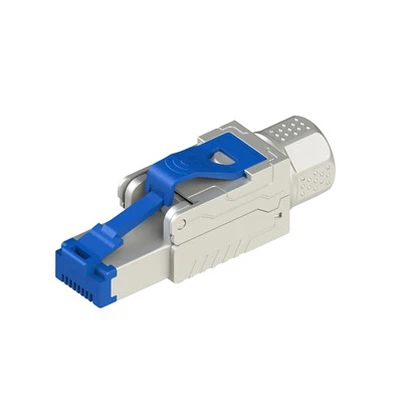
Cat 7 RJ45 Connector has a metal shielding shell, Since the Cat 7 LAN cables are all shielded structures, the metal shielding shell can reduce the crosstalk between the wire pairs.
13.2, Network faceplates/modules
The network module is used in the 86 faceplates and the patch cable is connected to the module.
While terminating the patch cables with the module, you need to follow the color labels on the module to punch down the patch cable.
The network modules also need to match the Category of patch cable, The most frequently used modules are Cat5E and Cat6 modules.
13.3, Patch cable extender:
Patch cable extenders are used to extend patch cables. When your patch cable is not long enough, you can extend it by using a cable extender, where both 2 ends of the adapter are plugged by the patch cable. However, the total cable length should not exceed 100 meters.

Patch cable adapters for extending LAN cables' length
13.4, Crimping Pliers
The crimping pliers also need to match the category of the patch cable. Common crimping pliers can only be used to make patch cables of Cat7 and below.
13.5, Patch Cable Tester
Used to test the connectivity of the patch cable. It is an essential tool for a low-voltage engineer.
14. How to make a patch cable
While using the crimping pliers to terminate the patch cable with an ethernet connector. We need to be very careful to cut the cable jacket, don't cut too deep to protect the outer skin of the core wires from being damaged.

The method to make a patch cable
15. Frequently asked questions about patch cables.
15.1, How do I replace the patch cable installed by the real estate developer?
If the real estate developer has already installed Cat5 patch cables, try to replace them with Cat5E or Cat6 cables.
You can first pull out the real estate developer's pre-built patch cable from the pipe and re-thread the Cat6 cable into the pipe.
The tool used is a threader. Just follow the instructions written on the threader. Be patient while threading and do not use brute force as this may cause the cable to get stuck.

Instructions on how to use the threader
15.2, Can the patch cable be extended?
If the patch cable reserved is not long enough or damaged, you can use the patch cable adapter to extend it, don't forget to terminate the
patch cable with rj45 connectors.
15.3, Fixing of exposed patch cables
If you need to install the exposed patch cables later, you can use the fixer or retainer to fix the cable to avoid cluttering.
15.4, RJ45 port extension
If the rj45 network port is not enough and you need to connect more networking devices, you need to use the switch as the extender. The switch is inexpensive and it is recommended to choose an iron-shell switch for better heat dissipation.
16. Summary
For home users, the network cable installed in the wall needs to be at least a Cat5E cable, and if it is a Cat5 cable, it is a must to replace it. If you want the network to reach the speed of 10 Gigabit, you need to use at least a Cat6 cable. If you need a 10G network, you can install Cat6A, Cat7 network cable, or optical fiber.