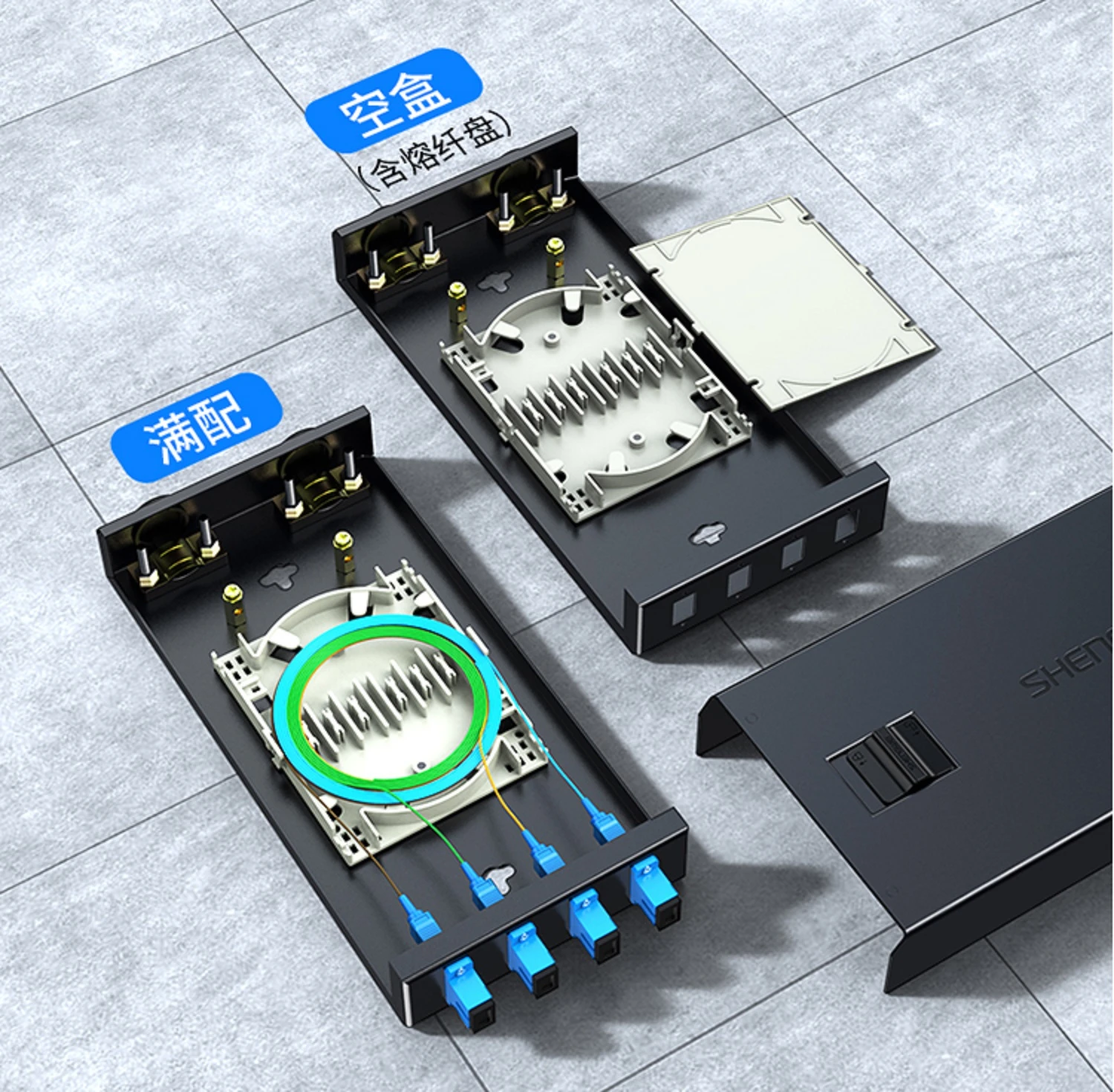
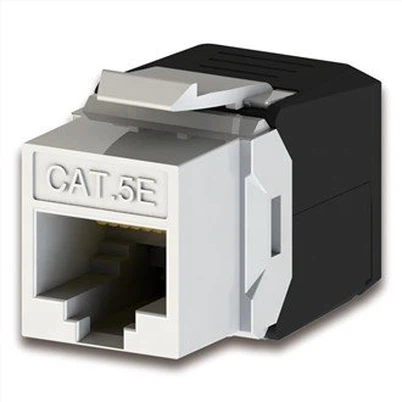
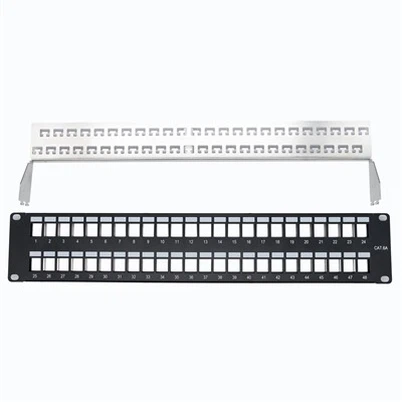
This article will tell throughly and comprehensively about fiber distribution frame and it will includes the following content:
2. Disassembly and Structural Overview of Fiber Distribution Frame
3. Installation and Applications of Fiber Distribution Frame
1. Application Scenarios and Development Trends of Fiber Distribution Frame
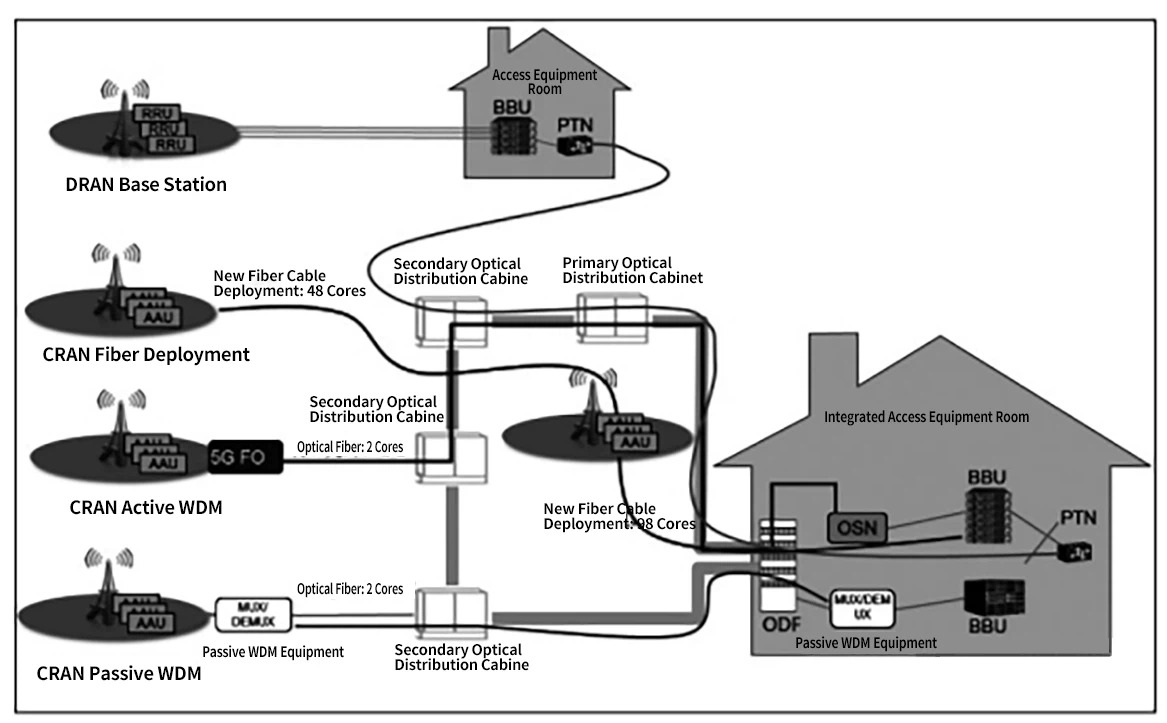
5G Deployment Diagram
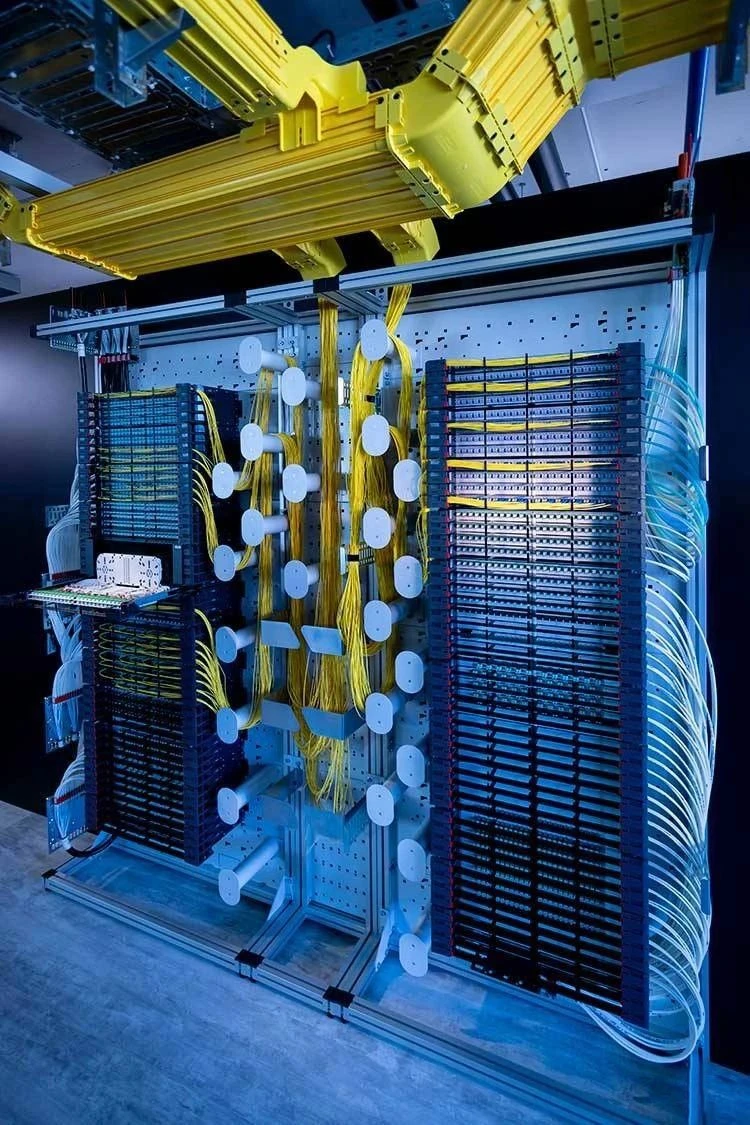
Data Center Layout Reference Diagram
Background: About FDF(Fiber Distribution Frame) and Its Modularization
FDF, or Fiber Distribution Frame, is a key component used for the termination, utilization, and management of optical cables between wiring rooms and equipment rooms. In structured cabling systems, ODFs are suitable for horizontal cabling between equipment or their terminations, as well as cross-connections at centralized points. The robust, easy-to-install design reduces installation and operational costs, while the large front labeling space facilitates port identification.
Wall-mounted fiber distribution frames are typically designed as box-like structures, ideal for locations with fewer cables and fiber cores. Rack-mounted fiber distribution frames can be directly installed in standard cabinets, making them ideal for large-scale optical networks. Rack-mounted frames are further categorized into two types: fixed-configuration frames where fiber couplers are mounted directly on the chassis, and modular designs that allow users to select modules corresponding to cable quantity and specifications, enabling easier network adjustments and expansion.
In transmission rooms or between equipment-especially when interconnecting different rooms-
fiber patch cords are used via ODFs. When distances are too long for patch cords to function effectively, fiber splicing becomes necessary (see DaShu's communication tutorial on fiber splicing for practical guidance).
ODF-Prime i770 Modular ODF - Drawer Type
A single sub-rack can accommodate four PRIME fiber units. These units can be combined and assembled in various ways without requiring tools for reconfiguration. The PRIME series includes modules for fiber terminations, splices, branch cables, jumpers, and ultra-long storage needs. When equipped with R&M's ultra-high-density LC adapters, the PRIME ODF's total capacity reaches 5,376 FO connections. This high packing density reduces the average cost per port.
The drawer system protects fibers during assembly, maintenance, and cleaning by retaining them within conduits. The channel system safeguards fibers as they are routed toward the splice area. Connectors can be inspected and operated by pulling drawers into service positions for cleaning or inspection.
2. Disassembly, Structural Overview, and Functions of Fiber Distribution Frames
The Fiber Distribution Frame (FDF) is a critical supporting device in optical transmission systems primarily used for tasks such as fiber splicing at cable terminals, optical connector installation, route adjustment, storage of excess pigtails, and cable protection. It plays an important role in ensuring secure operation within optical communication networks while enhancing flexibility during usage.
2.1 Features of Fiber Distribution Frames
Through comparative analysis conducted during recent optical communication construction projects, several key considerations have been identified when selecting an ODF:
2.2 Core Capacity:
The fiber core capacity of an fiber distribution frame should support the full installation of optical cables with the maximum number of fiber cores used within the exchange. Whenever possible, multiple optical cables with frequent interconnections should be installed on the same frame to simplify optical path configuration and management. Additionally, the distribution frame's capacity should align with standard fiber core counts commonly found in optical cables, minimizing or eliminating wasted capacity due to mismatched configurations during use.
2.3 Core Functions Types
As a terminal device for optical cable lines, the fiber distribution frame must possess four basic functions:
Fixation Function
When the optical cable enters the frame, its outer sheath and strength members must be mechanically fixed. Grounding protection components should be installed, and end protection measures should be applied. Fibers must also be grouped and protected.
Splicing Function
After splicing the fibers drawn from the optical cable to pigtails, excess fibers should be neatly coiled and securely stored, ensuring proper protection for splice joints.
Distribution Function
Connectors attached to pigtails are plugged into adapters, enabling optical path connection with connectors on the other side of the adapters. Adapters and connectors must allow flexible insertion and removal. Optical paths should support easy allocation and testing.
Storage Function
The fiber distribution frame must provide storage for various cross-connected
optical patch cords between
racks, allowing them to be neatly arranged in an organized manner. The internal structure of the fiber distribution frame must provide sufficient space and clear routing mechanisms to ensure clear fiber routing, ease of adjustment, and compliance with minimum bend radius specifications.
With the development of fiber optic networks, existing functionalities of fiber distribution frames are increasingly unable to meet emerging requirements. Some manufacturers have incorporated certain fiber network components-such as splitters, wavelength division multiplexers (WDM), and optical switches-directly into distribution frames. This approach not only simplifies their integration into networks but also enhances the functionality and flexibility of the fiber distribution frames.
2.4 Standard Fiber Distribution Frames
Standard Fiber distribution frames are typically available in fiber core counts such as 12, 24, 48, 72, 96, 144, etc.
2.5 The Splice Tray in the Fiber Distribution Frame
The splice tray in the Fiber Distribution Frame (FDF) can accommodate different types of fiber optic connectors, including FC, SC, LC, and ST adapters, depending on the type of optical cable and interface. The optical cables can be indoor/outdoor single-mode cables, multi-mode cables, or 10G OM3 cables.


FC fiber optic connector in the splice tray in the Fiber Distribution Frame

SC fiber optic connector in the splice tray in the Fiber Distribution Frame

LC fiber optic connector in the splice tray in the Fiber Distribution Frame

ST fiber optic connector in the splice tray in the Fiber Distribution Frame

Fiber distribution cabinet
Why is the splice tray called an integrated fusion splice tray? The reason is that It includes a plastic tray, fiber optic couplers, and pigtails (mostly bundled pigtails).

2.6 Introduction to bundled pigtails
Bundled pigtails, also called pigtail bundles, have a connector on one end and a bare fiber on the other. These are fused with other optical cable cores and are typically used in optical terminal boxes and distribution frames to link optical cables with terminal equipment.

The color sequence of bundled pigtails usually follows standard color code conventions.

A fiber optic coupler is a device that enables detachable (movable) connections between fibers. It tightly aligns the two ends of optical fibers to maximize light transfer between transmitting and receiving fibers while minimizing system disruption.
The commonly used optical fiber couplers are as follows:

In ODFs, square-shaped couplers often replace traditional FC couplers.

3. Installation and Applications of The Fiber Distribution Frame
The practical application of the fiber distribution frame:
secure the fiber optic cable,
Fusion splice the optical fibers
And prepare the fibers for routing.
The following outlines a case study using Huawei's E2000-ODF BOX system as an example:
Installation Process Overview:
Introduction to the Installation Process and Tools
Different Application Scenarios:
3.1 Installation Steps:
Select the appropriate installation step based on the on-site requirements. If space for installation is limited, follow Step 2 instead. For this guide, we'll use Step 1 as an example.
3.2 Installation approaches
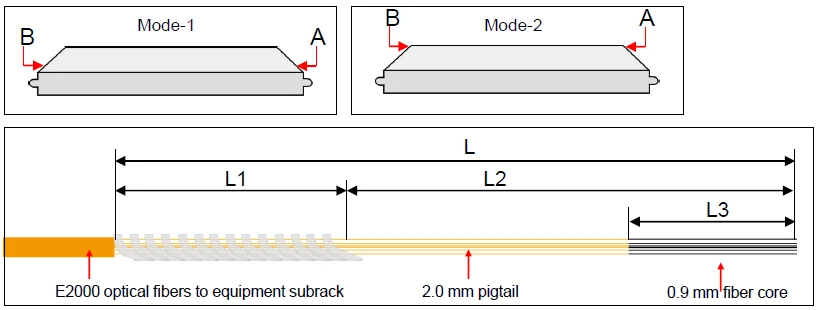
Two potential installation approaches are outlined based on spatial constraints-Mode A involves introducing E2000 fibers into equipment racks; Mode B introduces them into customer cabling areas (wiring closets). This guide focuses on Mode A as an example:
Tools Required:

3.3 Installation Process
3.3.1. Installing the Box on the Rack
Install floating nuts (cage nuts).

This guide demonstrates installation on a 19-inch open rack. The box can also be installed on a 21-inch open rack. The following instructions explain how to adjust mounting ear positioning for 21-inch open rack installation.
Maintain 100 mm vertical space between the WDM equipment box and sub-rack.
a. Mount On a 19-inch open rack
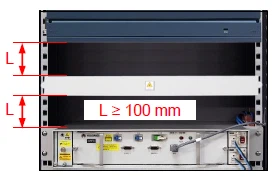
b. Mount On a 21-inch open rack
Thread panel screws through the mounting ears and tighten to secure the box.

Move the mounting ears to positions for 21-inch open racks.
Three preset mounting positions are provided.

Select the mounting position according to the rack's reserved installation depth.

3.3.2 Install E2000 fiber into the equipment rack
1)Guide the E2000 fiber into the equipment rack from the top of the rear side of the rack.
2)Strip the E2000 fiber to the required length while positioned on the subrack.

3) Use a stripping tool to remove approximately 40mm of the cable jacket from the end. After tearing off the tape, pull the rip cord to split the jacket approximately 1960mm, then remove the stripped jacket.

4)Trim the strength member at the stripped area, install an anti-buckling sleeve approximately 600mm long, and secure the end of the E2000 fiber to the rack with insulating tape.

5)Route the E2000 fiber from the rear to the front of the box using the strength member: Thread the strength member through the cable entry hole at the front of the box. Secure both the strength member and fiber to the rack with insulating tape. Then pull the strength member to guide the E2000 fiber to the front of the box.
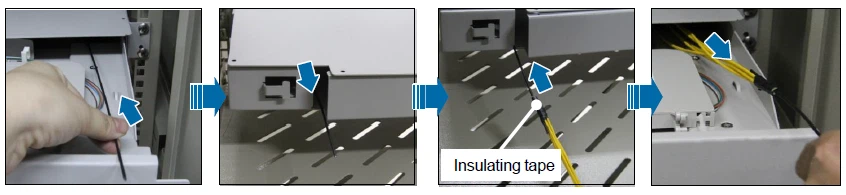
6)Feed the E2000 fiber from the incoming cable through the box's entry port in the equipment subrack.

7)Pull out the box from the subrack and neatly Entangled the E2000 fiber to the equipment rack.

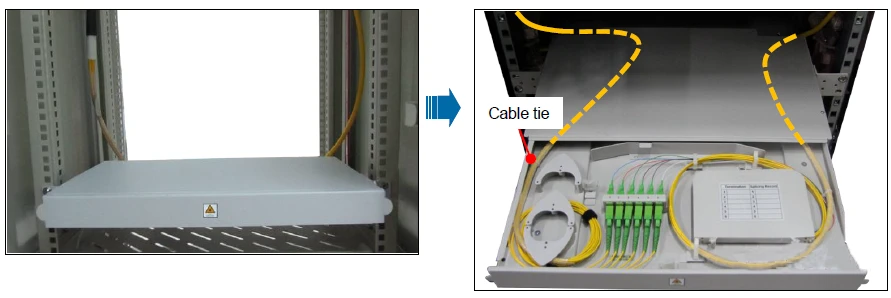
8)Secure the E2000 fiber to the rack with zip ties, then open the splice tray for splicing.

3.3.3 Connecting E2000 Fiber to Customer's Optical Cable
a. Route E2000 fiber into the customer's front-facing optical cable:


Install the anti-kink tube from this point.
The junction with cable ties should be at least 50mm horizontally from the box and 200mm–260mm vertically to ensure the fiber bend radius remains ≥30mm.
The E2000 fiber length to the customer's optical cable is approximately 1200mm. Anti-kink tube length = L + 100mm (L: E2000 fiber length when fully extending the cassette tray from the rack; 100mm: pre-installed anti-kink tube length within the box).
b. Install E2000 fiber into the customer's optical cable:
Remove the black cap and insert the connector into the adapter.
Coil the E2000 fiber within the customer's optical cable inside the box.
Observe the adapter's installation orientation.
Ensure pigtail numbers on E2000 fibers correspond to adapter bracket numbering.

Clean all fiber connectors during connection and testing (contaminated connectors increase optical loss and compromise test results).
Maintain fiber bend radius ≥30mm.

3.3.4. Splicing and Fiber Coiling
1) Note the requirements on fiber stripping lengths

2) Strip the 2.0mm E2000 fiber pigtail and route it into the equipment rack.

3)
a) Place the fiber into the splice protection tube.
b) Strip the pigtail of the E2000 fiber and splice it to the customer's optical cable, exposing 30 mm of the fiber core.
c) Strip the E2000 fiber and route it into the equipment rack, exposing 30 mm of the fiber core.
d) Clean the fiber core.

4) Use a fusion splicer to perform splicing and analyze any abnormalities that occur during this process.
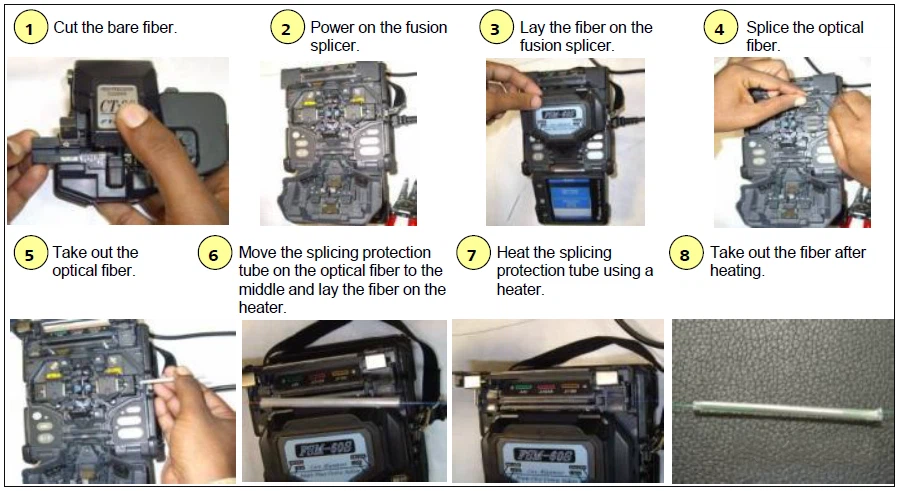
5) Coil the fiber onto the splice tray, then close the tray cover.

-Only splice pairs of fibers with matching outer sheath colors.
-The surface of each E2000 fiber pigtail is marked with a number for identification purposes.
6) Complete the path record and attach labels to each E2000 fiber pigtail, ensuring they correspond to the customer's optical cable.


7) Close the front panel to complete installation.

3.4 Other
This section provides optional procedures and additional guidelines for installation.
a Other installation methods (optional).
b Usage of E-2000™ service adapters: When inspecting an E2000 fiber connector's end face, avoid opening its metal cover with bare hands. Instead, use an E-2000™ service adapter designed specifically for this purpose.
c. About Step 2 of the Installation Process
d. Post-installation inspection: After completing installation, pull out and push in the box three times, then check for the following:
- Outside of box: Verify that optical cables are properly connected and maintain a bending radius of at least 30 mm.
- Inside of box: Check that fibers are not under tension and maintain a bending radius of at least 30 mm.
3.5 Conclusion:
Fiber Distribution Frames are indispensable in modern optical networks due to their versatility in handling termination tasks while offering scalable solutions tailored to evolving technological demands like modularity or high-density configurations like PRIME i770 systems discussed above.
By adhering strictly to installation guidelines outlined here-including proper routing techniques ensuring minimal signal loss/optimal performance reliability-users can maximize operational efficiency across diverse scenarios spanning data centers or telecom hubs alike!
4. Differences Between Fiber Distribution Frame and Fiber Terminal Box:
In fiber optic communication systems, both fiber distribution frames and fiber terminal boxes are essential components. However, in practical applications, they differ in functionality, structure, and usage scenarios.
4.1 Functionality Overview
The fiber distribution frame is primarily used for the access, distribution, and management of optical cables in fiber optic communication systems.
• Usually installed in communication rooms, network cabinets, or data centers as a central management hub for optical cables.
• Through the distribution frame, multiple optical cables can be connected, scheduled, and distributed, helping ensure the stability and reliability of the communication network.
• Additionally, it offers functions such as classification, labeling, organization, and protection of optical cables, making cable routing clearer and more organized, which simplifies management and maintenance.

The fiber terminal box is mainly used for end-point access, fixation, and distribution in fiber optic networks.
• It is usually installed on the user side-such as at the entrances of residential areas or office buildings-serving as an access point for the fiber optic network.
• Its primary functions include protecting optical fiber connections at the terminal while supporting fixation, splicing, and distribution.
• Through the fiber terminal box, optical signals from upstream networks are distributed to individual user endpoints.
4.2 Design Structure Features
The fiber distribution frame features a versatile design that allows quick and convenient adjustments and management of fiber optic lines.
• Enclosure: Constructed from metal with an anti-rust coating to resist corrosion.
• Internal Structure: Includes components like ODF splice trays, slots, flanges, and pigtails.
• Connections: Connections between adapters and splice trays typically use fusion splicing.
• Functions: Usually installed inside standard cabinets to connect vertical backbone cables with horizontal optical cables; supports functions such as cable fixation, protection, termination, splicing, and routing adjustments.
• Port Count: Typical port configurations range from 12 to 288.

The fiber terminal box is designed with simplicity and flexibility in mind to fix optical cable lines and provide workspace for cutting and splicing fibers.
• Enclosure: Generally made from metal or high-strength plastic with good mechanical strength and weather resistance; prioritizes portability and ease of wall mounting.
• Internal Structure: Contains components like splice trays, fixing devices, flanges, and pigtails. Splice trays neatly store fiber connectors and protective components while allowing sufficient spare fiber length; fixing devices secure cable sheaths, reinforcement elements, and pigtail connections.
• Functions: Fiber terminal boxes are typically placed at the endpoints of horizontal optical cables for wall-mounted or tabletop use; their main functions include enabling access, facilitating distribution, and protecting fiber lines.
• Port Count: Common configurations include 4 to 24 ports.
4.3 Application Scenarios
Fiber distribution frames are mainly utilized in large-scale communication rooms or data centers where significant volumes of optical cable access and distribution tasks need handling. Thanks to their high centralized management capabilities and scalability, they meet the requirements of extensive communication systems.
Fiber terminal boxes are more commonly applied in user-side access scenarios like residential areas or office buildings. In these settings, fiber terminal boxes distribute optical signals from upstream networks to individual users' endpoints to support applications like Fiber-to-the-Home (FTTH). With their simple yet flexible design characteristics, they effectively meet user-side access demands.
To summarize:
The fiber distribution frame and fiber terminal box differ significantly in functional roles, structural features, and usage scenarios. Choosing the right equipment based on specific needs helps ensure the stability and reliability of a fiber optic communication system.