

Different Types of Data Center Cable Management Clamp and How to Select the Right One
Leave a message
1. There are three types of COBTEL Cable Management Clamps categorized by material:
COBTEL Plastic Cable Management Clamp:
Made of fire-resistant ABS engineering plastic, it is aging-resistant, easy to use, and suitable for cable management and fixation in various data centers.
COBTEL Aluminum Cable Management Clamp:
Similar in use to the plastic cable management clamp, but each piece needs to be secured with two screws, making the installation process more labor-intensive.
COBTEL Power Cable Management Clamp:
Typically used for fixing power cables, also known as a power cable management clamp. It consists of pressure plates and fire-resistant padding. By combining the pads, it allows for the fixation of cables with diameters ranging from 6mm to 60mm.
2. COBTEL Plastic Cable Management Clamps:

There are two specifications for the COBTEL plastic cable management clamp, suitable for fixing cables with diameters less than 7mm (such as Cat5e/Cat6 cables) and cables with diameters between 7mm and 11mm (such as 8-core 2M cables). The steps for use are as follows:
A. Fix the first clamp onto the cable tray as the base using a nut. Determine whether to route cables through the first clamp based on the actual number of network cables.
B. Place the second clamp on top.
C. Route the cables through the second clamp.
D. Place the third clamp on top, and so on.
E. To unlock the clip, insert a flat-head screwdriver into any slot on either side and lift to release.
3. COBTEL Aluminum Cable Management Clamps:

The COBTEL aluminum Cable Management Clamp also comes in two specifications. Similar in use to the plastic cable management clamp, but each piece needs to be secured with two screws, making the installation more labor-intensive. Due to being cut from aluminum extrusions, the edges might have rough spots, so be careful to avoid scratching or damaging the cables. The steps for use are as follows:
A. Fix the aluminum Cable Management Clamp base onto the cable tray using a special nut.
B. Place the first aluminum Cable Management Clamp on the base and secure it with a special screw.
C. Route the cables and place the second aluminum Cable Management Clamp on top, securing it with a special screw.
D. Route the second layer of cables and place the third aluminum Cable Management Clamp on top, securing it with a special screw.
E. Repeat this process until all cables are laid out.
4. COBTEL Power Cable Management Clamps:
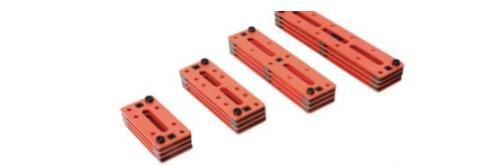
The COBTEL power cable management clamp has various specifications of fire-resistant pads, allowing for the fixation of cables with diameters ranging from 6mm to 60mm. Taking the fixation of a 40mm diameter cable as an example, the steps are as follows:
A. Fix the first pressure plate onto the cable tray using a nut.
B. Place a 6mm pad on each end of the first pressure plate. Place the second pressure plate and secure it diagonally to the first pressure plate with a 6*12 hex bolt.
C. Route three 40mm diameter cables.
D. Stack four 10mm pads on each end of the pressure plate to match the height of the cables. Place the third pressure plate on top and secure it diagonally to the lower pressure plate with a 6*46 hex bolt.
E. Repeat this process until all cables are laid out.


